
Hyundai Kona: Convenient features of your vehicle / Theft-alarm system
This system helps to protect your vehicle and valuables. The horn will sound and the hazard warning lights will blink continuously if any of the following occur:
- A door is opened without using the remote key or smart key.
- The tailgate
is opened without using the remote key or smart key.
- The engine hood is opened.
The alarm continues for 30 seconds, then the system resets. To turn off the alarm, unlock the doors with the remote key or smart key.
The Theft Alarm System automatically sets 30 seconds after you lock the doors and the tailgate. For the system to activate, you must lock the doors and the tailgate from outside the vehicle with the remote key or smart key or by pressing the button on the outside of the door handles with the smart key in your possession.
The hazard warning lights will blink and the chime will sound once to indicate the system is armed.
Once the security system is set, opening any door, the tailgate, or the hood without using the remote key or smart key will cause the alarm to activate.
The Theft Alarm System will not set if the hood, the tailgate, or any door is not fully closed. If the system will not set, check the hood, the tailgate, or the doors are fully closed.
Do not attempt to alter this system or add other devices to it.
Information
- Do not lock the doors until all passengers have left the vehicle. If the remaining passenger leaves the vehicle when the system is armed, the alarm will be activated.
- If the vehicle is not disarmed with the remote key or smart key, open the doors by using the mechanical key and place the ignition switch in the ON position (for remote key) or start the engine (for smart key) and wait for 30 seconds.
- When the system is disarmed but a door or tailgate is not opened within 30 seconds, the system will be rearmed.
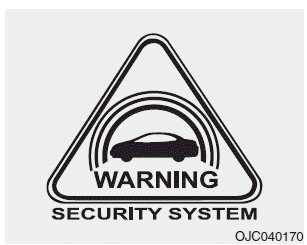
Information
Vehicles equipped with a theft alarm system will have a label attached to the vehicle with the following words:
1. WARNING
2. SECURITY SYSTEM
 Child-protector rear door locks
The child safety lock is provided to help prevent children seated in the rear
from accidentally opening the rear doors. The rear door safety locks should be used
whenever children are in the vehicl ...
 Steering wheel
...
Other information:
Hyundai Kona (OS) 2018-2026 Owners Manual: Parking Distance Warning (Reverse/Forward) system
[A] : Rear Sensor, [B] : Front Sensor
The Parking Distance Warning (Reverse/Forward) system assists the driver during
movement of the vehicle by chiming if any object is sensed within the distance of
100 cm (39 inches) in front and 120 cm (47 inches) behind the vehicle.
This system is a supplemen ...
Hyundai Kona (OS) 2018-2026 Service Manual: Sub Frame Repair procedures
Removal
1.
Loosen the wheel nuts slightly.
Raise the vehicle, and make sure it is securely supported.
2.
Remove the front wheel and tire (A) from the front hub.
Tightening torque :
107.9 - 12 ...
