
Hyundai Kona: Outside rearview mirror / Adjusting the rearview mirrors
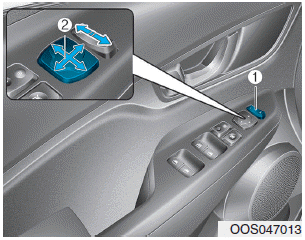
1. Press either the L (left side) or R (right side) button (1) to select the rearview mirror you would like to adjust.
2. Use the mirror adjustment control (2) to position the selected mirror up, down, left or right.
3. After adjustment, put the button into neutral (center) position to prevent inadvertent adjustment.
NOTICE
- The mirrors stop moving when they reach the maximum adjusting angles, but the motor continues to operate while the switch is pressed. Do not press the switch longer than necessary, the motor may be damaged.
- Do not attempt to adjust the outside rearview mirror by hand otherwise the motor may be damaged.
Folding the outside rearview mirror
Manual type
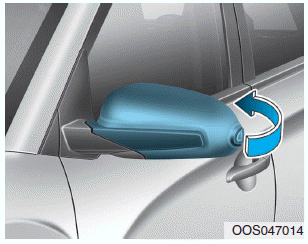
To fold the outside rearview mirror, grasp the housing of the mirror and then fold it toward the rear of the vehicle.
Electric type
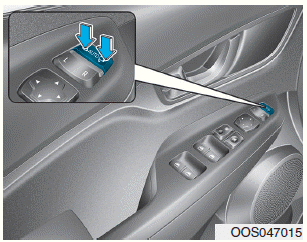
Left : The mirror will unfold.
Right : The mirror will fold.
Center (AUTO) : The mirror will fold or unfold automatically as follows:
- Without smart key system
- The mirror will fold or unfold when the door is locked or unlocked by the remote key and “Welcome mirror� in the User Setting Mode on the LCD display is activated. - With smart key system
- The mirror will fold or unfold when the door is locked or unlocked by the smart key and “Welcome mirror� in the User Setting Mode on the LCD display is activated.
- The mirror will fold or unfold when the door is locked or unlocked by the button on the outside door handle and “Welcome mirror� in the User Setting Mode on the LCD display is activated.
NOTICE
The electric type outside rearview mirror operates even though the ignition switch is in the OFF position. However, to prevent unnecessary battery discharge, do not adjust the mirrors longer than necessary while the engine is not running.
NOTICE
Do not fold the electric type outside rearview mirror by hand. It could cause motor failure.
 Outside rearview mirror
Be sure to adjust mirror angles before driving.
Your vehicle is equipped with both left-hand and right-hand outside rearview
mirrors.
The mirror can be adjusted remotely with the remote switch.
The ...
 Windows
...
Other information:
Hyundai Kona (OS) 2018-2026 Service Manual: Side Impact Sensor (SIS) Components and components location
Components
1. Front Pressure Side
Impact Sensor (P-SIS)
2. Front Gravity Side Impact
Sensor (G-SIS)
...
Hyundai Kona (OS) 2018-2026 Service Manual: Input shaft speed sensor 2 Description and operation
Description
•
Components location : DCT (Dual Clutch Transmission)
•
Function
The input shaft speed sensor is important in that it detects the input
shaft RPM and sends this information to the Transmission Contr ...
