
Hyundai Kona: Button Engine Start System / ESCL(Electronic Steering Column Lock) Repair procedures
Hyundai Kona (OS) 2018-2026 Service Manual / Body Electrical System / Button Engine Start System / ESCL(Electronic Steering Column Lock) Repair procedures
| Removal |
| 1. |
Disconnect the negative(-) battery terminal.
|
| 2. |
Remove the crash pad lower panel.
(Refer to Body - "Crash Pad Lower Panel")
|
| 3. |
Remove the steering column upper and lower shrouds.
(Refer to Body - "Steering Column Shroud Panel")
|
| 4. |
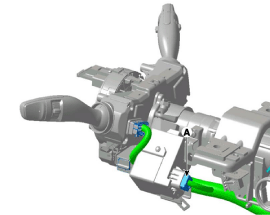
Disconnect the electronic steering column lock connector (A).
|
| 5. |
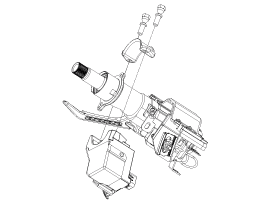
Remove the electronic steering column lock.
(Refer to Steering System - "Steering Column and Shaft")
|
| Installation |
| 1. |
Install the electronic steering column lock.
|

| 2. |
Install the steering column.
|
| 3. |
Install the crash pad lower panel.
|


Other information:
Hyundai Kona (OS) 2018-2026 Service Manual: Engine Control Module (ECM) Repair procedures
Removal
•
When replacing the ECM, the vehicle equipped with the immobilizer
must be performed procedure as below.
[In the case of installing used ECM]
...
Hyundai Kona (OS) 2018-2026 Service Manual: Photo Sensor Repair procedures
Inspection
1.
Turn the ignition switch ON.
2.
Connect the GDS.
3.
Emit intensive light toward the photo sensor using a lamp, and check
the output voltage change.
...
© 2018-2026 www.hkona.com
