
Hyundai Kona: Audio / Audio Unit Components and components location
Hyundai Kona (OS) 2018-2026 Service Manual / Body Electrical System / Audio / Audio Unit Components and components location
| Components |
[RADIO/MP3]
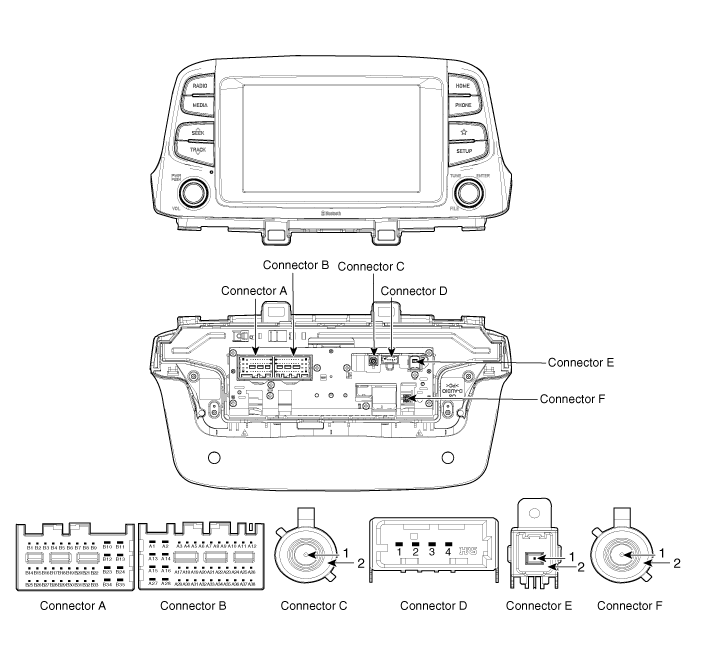
Connector Pin Information
|
NO |
Connector A |
Connector B |
Connector C |
Connector D |
Connector E |
|
1 |
Rear left speaker (+) |
ㅡ |
GPS signal |
USB power |
FM / AM signal |
|
2 |
Rear left speaker (-) |
MIC siganl(+) |
GND |
USB DATA (-) |
GND |
|
3 |
ㅡ |
ㅡ |
|
USB DATA (+) |
|
|
4 |
ㅡ |
ㅡ |
|
USB GND |
|
|
5 |
ㅡ |
Antenna power |
|
|
|
|
6 |
Camera power |
ILL (+) |
|
|
|
|
7 |
Camera video |
MM CAN HI |
|
|
|
|
8 |
ㅡ |
ㅡ |
|
|
|
|
9 |
ㅡ |
ㅡ |
|
|
|
|
10 |
AUX audio(RH) |
Battery (+) |
|
|
|
|
11 |
AUX detect |
Battery (+) |
|
|
|
|
12 |
Steering wheel key |
GND |
|
|
|
|
13 |
Front left speaker (+) |
GND |
|
|
|
|
14 |
Front left speaker (-) |
MIC GND |
|
|
|
|
15 |
Front right speaker (-) |
MIC siganl (-) |
|
|
|
|
16 |
Front right speaker (+) |
ㅡ |
|
|
|
|
17 |
ㅡ |
ㅡ |
|
|
|
|
18 |
ㅡ |
ㅡ |
|
|
|
|
19 |
ㅡ |
ILL (-) |
|
|
|
|
20 |
Camera power GND |
MM CAN LO |
|
|
|
|
21 |
Camera video GND |
ㅡ |
|
|
|
|
22 |
ㅡ |
ACC |
|
|
|
|
23 |
|
ㅡ |
|
|
|
|
24 |
AUX audio (LH) |
ㅡ |
|
|
|
|
25 |
AUX audio GND |
ㅡ |
|
|
|
|
26 |
Steering wheel key GND |
ㅡ |
|
|
|
|
27 |
Rear right speaker (-) |
ㅡ |
|
|
|
|
28 |
Rear right speaker (+) |
ㅡ |
|
|
|
|
29 |
ㅡ |
ㅡ |
|
|
|
|
30 |
ㅡ |
ㅡ |
|
|
|
|
31 |
ㅡ |
ㅡ |
|
|
|
|
32 |
ㅡ |
ㅡ (IGN3) |
|
|
|
|
33 |
Camera shield GND |
IGN 1 |
|
|
|
|
34 |
ㅡ |
ㅡ |
|
|
|
|
35 |
ㅡ |
ㅡ |
|
|
|
|
36 |
ㅡ |
|
|
|
|
|
37 |
ㅡ |
|
|
|
|
|
38 |
ㅡ |
|
|
|
|
[MONO]
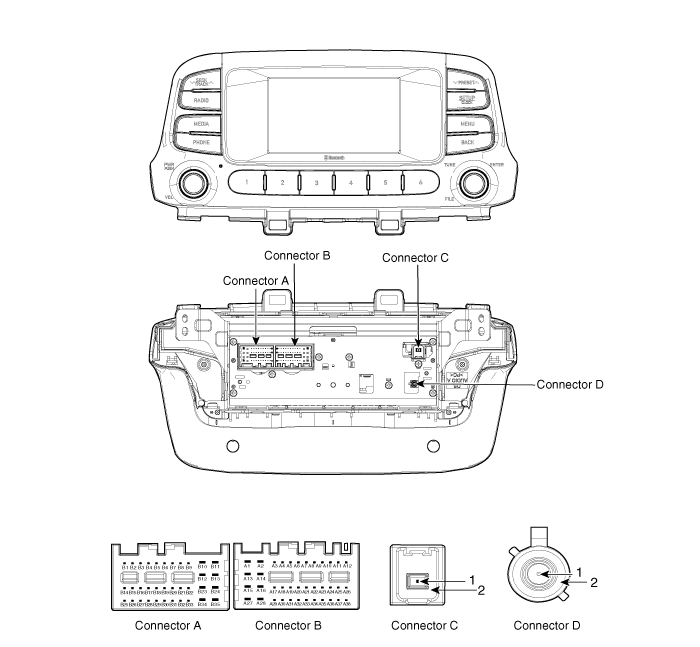
Connector Pin Information
|
NO |
Connector A |
Connector B |
Connector C |
|
1 |
Rear left speaker (+) |
ㅡ |
FM / AM signal |
|
2 |
Rear left speaker (-) |
MIC signal(+) |
GND |
|
3 |
USB GND |
ㅡ |
|
|
4 |
USB data (HI) |
ㅡ |
|
|
5 |
USB data (LO) |
Remote antenna |
|
|
6 |
USB VCC |
ILL (+) |
|
|
7 |
ㅡ |
MM CAN HI |
|
|
8 |
ㅡ |
ㅡ |
|
|
9 |
ㅡ |
ㅡ |
|
|
10 |
AUX audio (RH) |
Battery (+) |
|
|
11 |
AUX DETECT |
Battery (+) |
|
|
12 |
Steering wheel key |
GND |
|
|
13 |
Front left speaker (+) |
GND |
|
|
14 |
Front left speaker (-) |
ㅡ |
|
|
15 |
Front right speaker (-) |
MIC signal (-) |
|
|
16 |
Front right speaker (+) |
ㅡ |
|
|
17 |
ㅡ |
ㅡ |
|
|
18 |
ㅡ |
Speed |
|
|
19 |
ㅡ |
ILL (-) |
|
|
20 |
ㅡ |
MM CAN LO |
|
|
21 |
ㅡ |
ㅡ |
|
|
22 |
ㅡ |
ACC |
|
|
23 |
|
ㅡ |
|
|
24 |
AUX audio (LH) |
ㅡ |
|
|
25 |
AUX audio GND |
ㅡ |
|
|
26 |
Steering wheel key GND |
ㅡ |
|
|
27 |
Rear right speaker (-) |
ㅡ |
|
|
28 |
Rear right speaker (+) |
ㅡ |
|
|
29 |
ㅡ |
ㅡ |
|
|
30 |
ㅡ |
ㅡ |
|
|
31 |
ㅡ |
ㅡ |
|
|
32 |
ㅡ |
IGN 1 |
|
|
33 |
ㅡ |
ㅡ |
|
|
34 |
ㅡ |
ㅡ |
|
|
35 |
ㅡ |
ㅡ |
|
|
36 |
ㅡ |
|
|
|
37 |
ㅡ |
|
|
|
38 |
ㅡ |
|
|
 Components and components location
Component Location
1. Audio unit
2. Feeder cable joint connector
3. Roof antenna
4. Front door speaker
5. Rear door speaker
6. Antenna feeder cable
...
 Audio Unit Repair procedures
Removal
1.
Disconnect the negative (-) battery terminal.
2.
Remove the center fascia panal.
(Refer to Body - "Center Fascia Pa ...
Other information:
Hyundai Kona (OS) 2018-2026 Service Manual: Blower Motor Repair procedures
Inspection
1.
Connect the battery voltage and check the blower motor rotation.
2.
If the blower motor does not operate well, substitute with a known-good
blower motor and check for proper operation.
...
Hyundai Kona (OS) 2018-2026 Service Manual: Liftgate Weatherstrip Repair procedures
Replacement
1.
Remove the liftgate weatherstrip (A).
•
Do not apply sealant to the body.
...
© 2018-2026 www.hkona.com
