
Hyundai Kona: Headrest / Front seat headrests
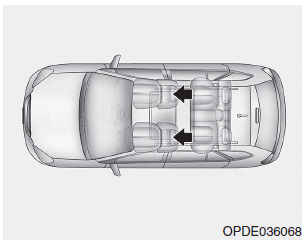
The driver’s and front passenger’s seats are equipped with adjustable headrests for the passengers safety and comfort.
Adjusting the height up and down
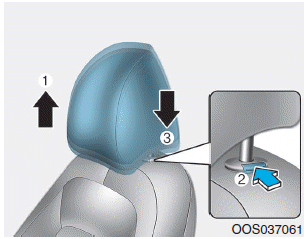
To raise the headrest:
1. Pull it up to the desired position (1).
To lower the headrest:
1. Push and hold the release button (2) on the headrest support.
2. Lower the headrest to the desired position (3).
Forward and rearward adjustment
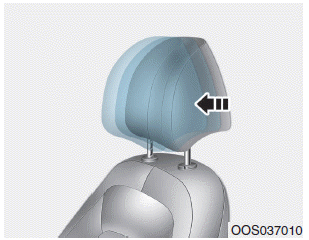
The headrest may be adjusted forward to 3 different positions by pulling the headrest forward to the desired detent. To adjust the headrest to it’s furthest rearwards position, pull it fully forward to the farthest position and release it.
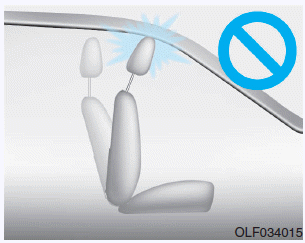
NOTICE
If you recline the seatback towards the front with the headrest and seat cushion raised, the headrest may come in contact with the sunvisor or other parts of the vehicle.
Removal/Reinstall
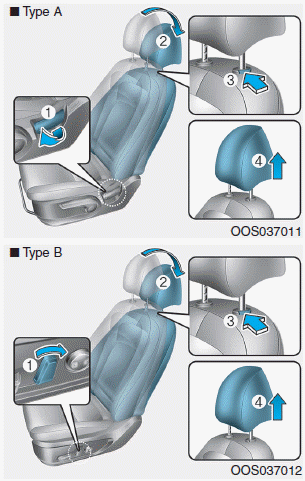
To remove the headrest:
1. Recline the seatback (2) with using the seatback angle lever or switch (1).
2. Raise the headrest as far as it can go.
3. Press the headrest release button (3) while pulling the headrest up (4).
WARNING
NEVER allow anyone to travel in a seat with the headrest removed.
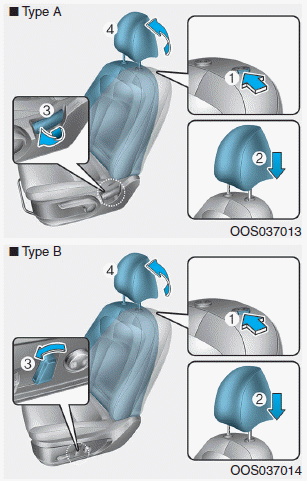
To reinstall the headrest :
1. Recline the seatback.
2. Put the headrest poles (2) into the holes while pressing the release button (1).
3. Adjust the headrest to the appropriate height.
4. Recline the seatback (4) the seatback angle knob or switch (3).
WARNING
Always make sure the headrest locks into position after reinstalling and adjusting it properly.
 Headrest
The vehicle’s front and rear seats have adjustable headrests. The headrests provide
comfort for passengers, but more importantly they are designed to help protect passengers
from whiplash and othe ...
 Rear seat headrests
The rear seats are equipped with headrests in all the seating positions for the
passenger’s safety and comfort.
CAUTION
• Adjust the headrests so the middle of the headrests is at the same heigh ...
Other information:
Hyundai Kona (OS) 2018-2026 Service Manual: Rear Transverse Trim Repair procedures
Replacement
•
Put on gloves to prevent hand injuries.
•
Wh ...
Hyundai Kona (OS) 2018-2026 Owners Manual: AUTO STOP Indicator Light
This indicator light illuminates:
When the engine enters the Idle Stop mode of the ISG (Idle Stop and Go)
system.
This indicator light blinks:
When the automatic starting occurs, the AUTO STOP indicator on the cluster
will blink for 5 seconds.
Information
When the engine automatically sta ...
