
Hyundai Kona: Interior Trim / Rear Pillar Trim Repair procedures
Hyundai Kona (OS) 2018-2026 Service Manual / Body (Interior and Exterior) / Interior Trim / Rear Pillar Trim Repair procedures
| Replacement |
|

|

| 1. |
Remove the luggage side trim.
(Refer to Interior Trim - "Luggage Side Trim")
|
| 2. |
After loosening the mounting bolts, remove the rear pillar trim (A).
|
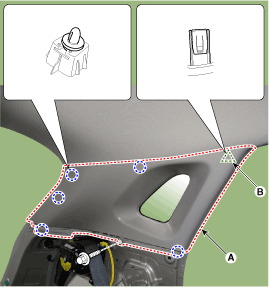
| 3. |
To install, reverse removal procedure.
|

 Rear Pillar Trim Components and components location
Component Location
1. Rear pillar trim
...
 Trunk Trim
...
Other information:
Hyundai Kona (OS) 2018-2026 Service Manual: Front Seat Shield Inner Cover Repair procedures
Replacement
•
Put on gloves to prevent hand injuries.
•
Wh ...
Hyundai Kona (OS) 2018-2026 Service Manual: Audio Unit Repair procedures
Removal
1.
Disconnect the negative (-) battery terminal.
2.
Remove the center fascia panal.
(Refer to Body - "Center Fascia Panal")
3.
Remove the crashpad garnish.
(Refer to Body - &qu ...
© 2018-2026 www.hkona.com
