Hyundai Kona: Interior Trim / Center Pillar Trim Repair procedures
[Center pillar lower trim]
| • |
Put on gloves to prevent hand injuries.
|
|
| • |
When removing with a flat-tip screwdriver or remover, wrap protective
tape around the tools to prevent damage to components.
|
| • |
When removing the interior trim pieces, use a plastic panel
removal tool not to damage the surface.
|
| • |
Take care not to bend or scratch the trim and panels.
|
|
| 1. |
Carefully remove the front door body side weatherstrip.
|
| 2. |
Carefully remove the rear door body side weatherstrip.
|
| 3. |
Remove the front door scuff trim.
(Refer to Interior Trim - "Door Scuff Trim")
|
| 4. |
Remove the rear door scuff trim.
(Refer to Interior Trim - "Door Scuff Trim")
|
| 5. |
Using a screwdriver or remover, remove the center pillar lower trim
(A).
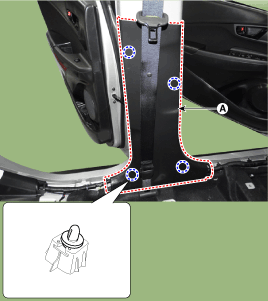
|
| 6. |
To install, reverse removal procedure.
| •
|
Replace any damaged clips (or pin-type retainers).
|
|
|
[Center pillar upper trim]
| • |
Put on gloves to prevent hand injuries.
|
|
| • |
When removing with a flat-tip screwdriver or remover, wrap protective
tape around the tools to prevent damage to components.
|
| • |
When removing the interior trim pieces, use a plastic panel
removal tool not to damage the surface.
|
| • |
Take care not to bend or scratch the trim and panels.
|
|
| 1. |
Remove the center pillar lower trim.
(Refer to Interior Trim - "Center Pillar Trim")
|
| 2. |
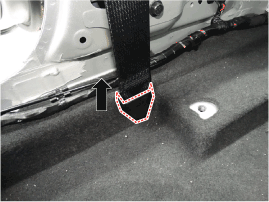
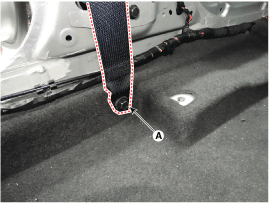
After loosening the mounting bolt, then remove the front seat belt lower
anchor (A).
|
Tightening torque :
39.2 - 53.9 N.m (4.0 - 5.5 kgf.m, 28.8 - 39.8 lb-ft)
|
| •
|
When installing the connector, be sure to insert it
to the anchor pretensioner until "click" sound is heard
and then check it for secure installation by pulling
it.
|
|
|
| 3. |
After loosening the mounting bolt, remove the center pillar upper trim
(A).
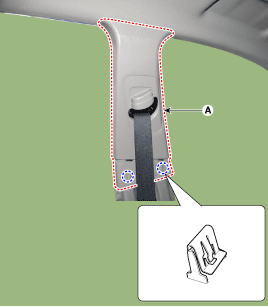
|
| 4. |
To install, reverse removal procedure.
| •
|
Replace any damaged clips (or pin-type retainers).
|
|
|
Component Location
1. Center pillar lower trim
2. Center pillar upper trim
...
Component Location
1. Rear transverse trim
...



 Center Pillar Trim Components and components location
 Rear Transverse Trim Components and components location