
Hyundai Kona: Rear Door / Rear Door Trim Repair procedures
| Replacement |
|

|

| 1. |
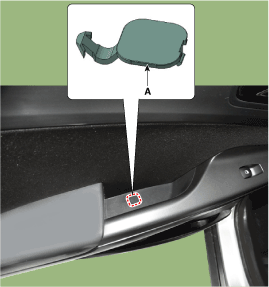
Using a flat-tip or remover, remove the rear door pull handle mounting
cap (A).
|
| 2. |
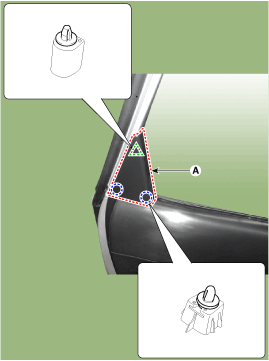
Using a screwdriver or remover, remove the rear door delta inner cover
(A).
|
| 3. |
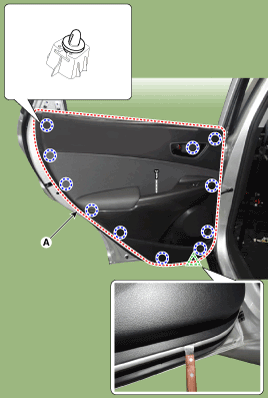
After loosening the mounting screws, remove the rear door trim (A).
|
| 4. |
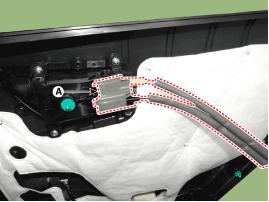
Remove the rear door inside handle cage (A).
|
| 5. |
Disconnect the power window switch connector (A).
|
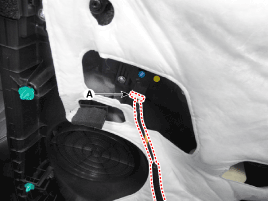
| 6. |
To install, reverse removal procedure.
|

 Rear Door Trim Components and components location
Component Location
1. Rear door trim
...
 Rear Door Inside Handle Repair procedures
Replacement
1.
Remove the rear door trim.
(Refer to Rear Door - "Rear Door Trim")
2.
After loosening the mounting screws, ...
Other information:
Hyundai Kona (OS) 2018-2026 Owners Manual: Checking the amount of air conditioner refrigerant and compressor lubricant
When the amount of refrigerant is low, the performance of the air conditioning
is reduced. Overfilling also reduces the performance of the air conditioning system.
Therefore, if abnormal operation is found, we recommend that the system be inspected
by an authorized HYUNDAI dealer.
WARNING
Vehicles ...
Hyundai Kona (OS) 2018-2026 Owners Manual: Electric Chromic Mirror (ECM)
The electric rearview mirror automatically controls the glare from the headlamp
of the vehicle behind you in nighttime or low light driving conditions.
When the engine is running, the glare is automatically controlled by the sensor
mounted in the rearview mirror. The sensor detects the light level ...
