
Hyundai Kona: Fender / Repair procedures
Hyundai Kona (OS) 2018-2026 Service Manual / Body (Interior and Exterior) / Fender / Repair procedures
| Replacement |
|

|

| 1. |
Remove the front bumper.
(Refer to Front Bumper - "Front Bumper Cover")
|
| 2. |
Remove the head lamps.
(Refer to Body Electrical System - "Head Lamps")
|
| 3. |
Remove the front wheel guard.
(Refer to Body Side Molding - "Front Wheel Guard")
|
| 4. |
Remove the fender garnish.
(Refer to Body Side Molding - "Fender Garnish.")
|
| 5. |
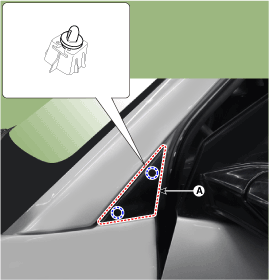
Using a screwdriver or remover, remove the delta garnish (A).
|
| 6. |
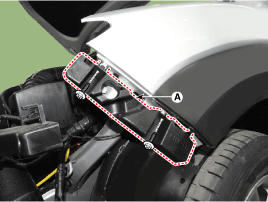
Remove the front bumper side mounthing bracket (A) after loosening the
bolts.
|
| 7. |
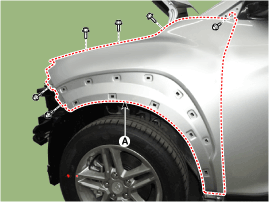
After loosening the mounting bolts remove the fender assembly (A).
|
| 8. |
To install, reverse removal procedure.
|
 Components and components location
Component Location
1. Fender assembly
...
 Hood
Hood
...
Other information:
Hyundai Kona (OS) 2018-2026 Service Manual: Front Seat Assembly Repair procedures
Replacement
1.
Open the cover and loosen the front seat mounting bolts.
[Front]
Tightening torque :
49.0 - 63.7 N.m (5.0 - 6.5 kgf.m, 36.2 - 47.0 lb-ft)
[Rear]
2 ...
Hyundai Kona (OS) 2018-2026 Service Manual: Components and components location
Component Location (1)
1. Interior antenna 1
2. Interior antenna 2
3. Door outside handle / Door antenna
4. Smart key unit (SMK)
5. Buzzer
Component Location (2)
1. Trunk open switch
2. Bumper antenna
3. ...
© 2018-2026 www.hkona.com
