
Hyundai Kona: Multifunction Switch / Repair procedures
Hyundai Kona (OS) 2018-2026 Service Manual / Body Electrical System / Multifunction Switch / Repair procedures
| Removal |
| 1. |
Disconnect the negative (-) battery terminal.
|
| 2. |
Remove the steering wheel.
(Refer to Steering System - "Steering Wheel")
|
| 3. |
Remove the steering column upper and lower shrouds after loosening the
screws.
(Refer to Body - "Steering Column Shroud Panal")
|
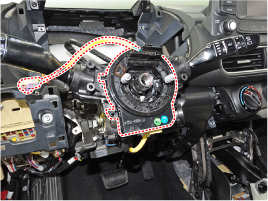
| 4. |
Remove the clock spring.
(Refer to Restraint - "Driver Airbag (DAB) Module and Clock Spring")
|
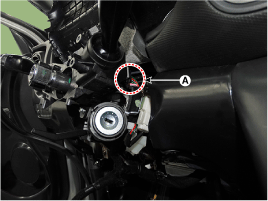
| 5. |
Disconnect the multifunction switch connector (A).
|
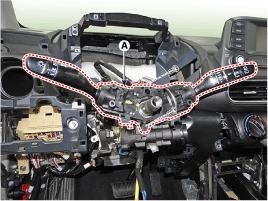
| 6. |
Remove the multifunction switch assembly (A) after loosening the screws.
|
| Installation |
| 1. |
Install the multifunction switch.
|
| 2. |
Install the clock spring.
|
| 3. |
Install the steering column upper and lower shrouds.
|
| 4. |
Install the steering wheel.
|
| 5. |
Connect the negative (-) battery terminal.
|
| Inspection |
Multifunction Switch Inspection
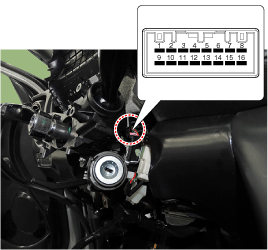
| 1. |
Check for continuity between the terminals in each switch position according
to the table.
[Left Handle Drive]
|
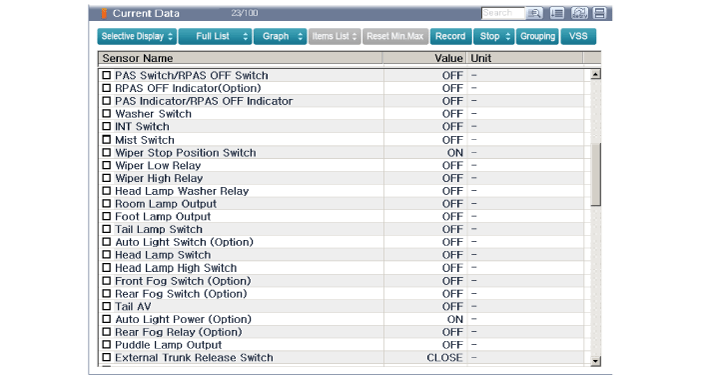
Inspection (with GDS)
| 1. |
The body electrocal system can be quickly diagnosed failed parts with
vehicle diagnostic system(GDS).
The diagnostic system (GDS) provides the following information.
|
| 2. |
Select the "Car Model" and the system to be checked in order to check
the vehicle with the tester.
|
| 3. |
Select the "Body Control Module (BCM)" to check the multi function switch.
|
| 4. |
Select the "Current Data" menu to search the current state of the input/output
data.
The input/output data for the sensors corresponding to the multi function
switch can be checked.
|
 Components and components location
Component
1. Steering column
2. Multifunction switch
3. Screw
4. Clock spring
...
 Horn
Horn
...
Other information:
Hyundai Kona (OS) 2018-2026 Owners Manual: Jump starting
Jump starting can be dangerous if done incorrectly. Follow the jump starting
procedure in this section to avoid serious injury or damage to your vehicle. If
in doubt about how to properly jump start your vehicle, we strongly recommend that
you have a service technician or towing service do it for ...
Hyundai Kona (OS) 2018-2026 Service Manual: Front Seat Assembly Repair procedures
Replacement
1.
Open the cover and loosen the front seat mounting bolts.
[Front]
Tightening torque :
49.0 - 63.7 N.m (5.0 - 6.5 kgf.m, 36.2 - 47.0 lb-ft)
[Rear]
2 ...
© 2018-2026 www.hkona.com
