
Hyundai Kona: Operating door locks from outside the vehicle / Smart key
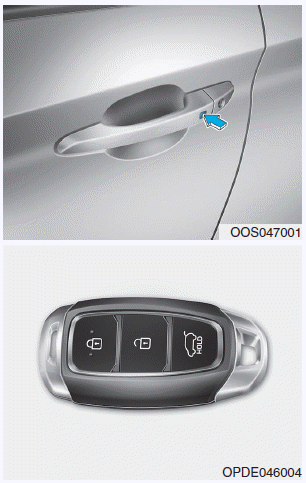
To lock the doors, press the button on the outside door handle while carrying the smart key with you or press the door lock button on the smart key.
To unlock the doors, press the button on the outside door handle while carrying the smart key with you or press the door unlock button on the smart key.
Once the doors are unlocked, they may be opened by pulling the door handle.
When closing the door, push the door by hand. Make sure that doors are closed securely.
Information
- In cold and wet climates, door lock and door mechanisms may not work properly due to freezing conditions.
- If the door is locked/unlocked multiple times in rapid succession with either the vehicle key or door lock switch, the system may stop operating temporarily in order to protect the circuit and prevent damage to system components.
 Remote key
To lock the doors, press the Door Lock button (1) on the remote key.
To unlock the doors, press the Door Unlock button (2) on the remote key.
Once the doors are unlocked, they may be opened by pullin ...

Other information:
Hyundai Kona (OS) 2018-2026 Owners Manual: Front seat warmers
Seat warmers are provided to warm the seats during cold weather.
WARNING
The seat warmers can cause a SERIOUS BURN, even at low temperatures and especially
if used for long periods of time.
Passengers must be able to feel if the seat is becoming too warm so they can
turn it off, if needed.
People ...
Hyundai Kona (OS) 2018-2026 Owners Manual: Outside rearview mirror
Be sure to adjust mirror angles before driving.
Your vehicle is equipped with both left-hand and right-hand outside rearview
mirrors.
The mirror can be adjusted remotely with the remote switch.
The mirror heads can be folded to prevent damage during an automatic car wash
or when passing through a ...
