
Hyundai Kona: Roof Trim / Sunvisor Repair procedures
Hyundai Kona (OS) 2018-2026 Service Manual / Body (Interior and Exterior) / Roof Trim / Sunvisor Repair procedures
| Replacement |
|

|

| 1. |
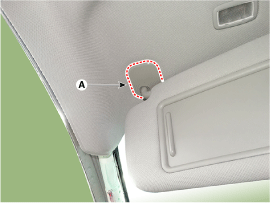
Remove the sunvisor mounting cover (A).
|
| 2. |
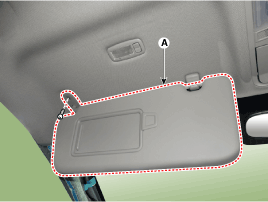
Loosen the mounting screw and seperate the sunvisor (A).
|
| 3. |
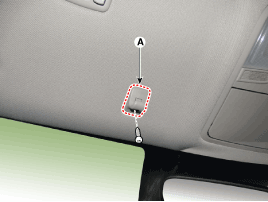
Loosen the mounting screws and remove the retainer (A).
|
| 4. |
To install, reverse removal procedure.
|

 Sunvisor Components and components location
Component Location
1. Sunvisor
2. Retainer
...
 Assist Handle Components and components location
Component Location
1. Assist handle
...
Other information:
Hyundai Kona (OS) 2018-2026 Service Manual: Front Seat Belt Buckle Components and components location
Component Location
1. Front seat belt buckle
...
Hyundai Kona (OS) 2018-2026 Owners Manual: Owner maintenance schedule
When you stop for fuel:
Check the engine oil level.
Check the coolant level in the engine coolant reservoir.
Check the windshield washer fluid level.
Check for low or under-inflated tires.
WARNING
Be careful when checking your engine coolant level when the engine is hot.
This may result in co ...
© 2018-2026 www.hkona.com
