
Hyundai Kona: AVN System / AVN Remote Controller Repair procedures
Hyundai Kona (OS) 2018-2026 Service Manual / Body Electrical System / AVN System / AVN Remote Controller Repair procedures
| Inspection |
| 1. |
Check for resistance between terminals in each switch position (LH).
[LH : Audio + Hands free]
|
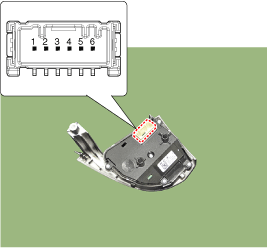
| 2. |
Check for resistance between terminals in each switch position (RH).
[RH : Trip + Cruise]
|
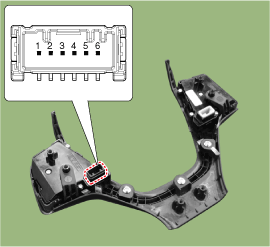
| Removal |
| 1. |
Disconnect the negative (-) battery terminal.
|
| 2. |
Remove the steering wheel assembly.
(Refer to Steering System - "Steering Wheel")
|
| 3. |
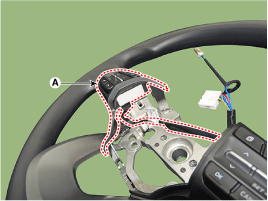
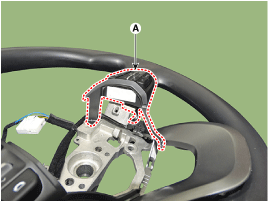
Remove the steering lower cover (A).
|
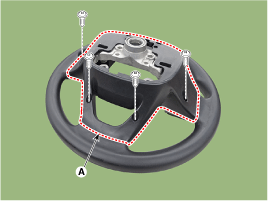
| 4. |
Loosen the steering remote control switch mounting screw.
|
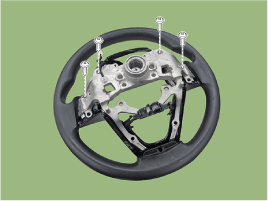
| 5. |
Remove the steering wheel remote control switch (A).
|
| Installation |
| 1. |
Install the steering wheel remote control after connecting the connector.
|
| 2. |
Install the steering wheel.
|
| 3. |
Connect the negative (-) battery terminal.
|
 AVN Remote Controller Schematic diagrams
Circuit Diagram
[Audio + B/Tooth + Voice]
[Trip]
[Trip / Cruise]
[Trip / Cruise/ Smart Cruise]
...
 AVN Antenna Components and components location
Components
[Roof Antenna (GPS)]
...
Other information:
Hyundai Kona (OS) 2018-2026 Owners Manual: Jump starting
Jump starting can be dangerous if done incorrectly. Follow the jump starting
procedure in this section to avoid serious injury or damage to your vehicle. If
in doubt about how to properly jump start your vehicle, we strongly recommend that
you have a service technician or towing service do it for ...
Hyundai Kona (OS) 2018-2026 Service Manual: Evaporator Core Repair procedures
Replacement
1.
Disconnect the negative (-) battery terminal.
2.
Remove the heater and blower assembly.
(Refer to Heater - "Heater Unit")
3.
Remove the evaporato ...
© 2018-2026 www.hkona.com
