
Hyundai Kona: Ignition Switch Assembly / Back View Camera System Repair procedures
Hyundai Kona (OS) 2018-2026 Service Manual / Body Electrical System / Ignition Switch Assembly / Back View Camera System Repair procedures
| Removal |
| 1. |
Disconnect the negative (-) battery terminal.
|
| 2. |
Remove the trunk lide trim.
(Refer to Body - "Trunk Lid Trim")
|
| 3. |
Disconnect the back view camera connector.
|
| 4. |
Remove the back view camera after loosening the moungting screws.
|
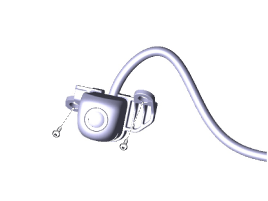
| Installation |
| 1. |
Install the back view camera.
|
| 2. |
Install the trunk lid trim.
|
| 3. |
Connect the negative (-) battery terminal.
|
 Back View Camera System Description and operation
Description
Back view camera will activate when the backup light is ON with the ignition
switch ON and the shift lever in the R position.
This system is a supplemental ...

Other information:
Hyundai Kona (OS) 2018-2026 Service Manual: Components and components location
Components
1. Drive air bag module (DAB)
2. Ornament
3. Remote control switch
4. Wiring
5. Steering wheel
6. Paddle shift switch
7. Lower cover
...
Hyundai Kona (OS) 2018-2026 Owners Manual: Emergency towing
If towing is necessary, we recommend you have it done by an authorized HYUNDAI
dealer or a commercial tow truck service.
If a towing service is not available in an emergency, your vehicle may be temporarily
towed using a cable or chain secured to the emergency towing hook at the front (or
rear) ...
В© 2018-2026 www.hkona.com
