
Hyundai Kona: Charging System / DC/DC Converter Repair procedures
Hyundai Kona (OS) 2018-2026 Service Manual / Engine Electrical System / Charging System / DC/DC Converter Repair procedures
| Removal |
[200W]
| 1. |
Turn the ignition switch OFF and disconnect the battery negative (-)
terminal.
|
| 2. |
Remove the crash pad lower panel.
(Refer to Body - "Crash Pad Lower Panel")
|
| 3. |
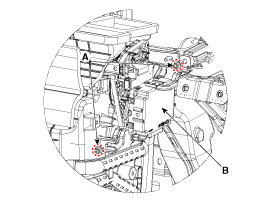
Disconnect the DC/DC converter connector.
|
| 4. |
Remove the DC/DC converter (B) after removing the nuts (A).
|
[450W]
| 1. |
Turn the ignition switch OFF and disconnect the battery negative (-)
terminal.
|
| 2. |
Remove the heater & A/C control unit.
(Refer to Heating, Ventilation and Air Conditioning - "Heater & A/C
Control Unit")
|
| 3. |
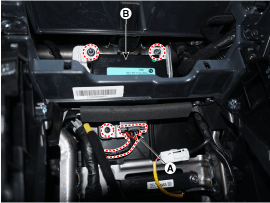
Disconnect the DC/DC converter connector (A).
|
| 4. |
Remove the DC/DC converter (B) after removing the screw & nuts.
|
| Installation |
| 1. |
Install in the reverse order of removal.
|

 DC/DC Converter Schematic diagrams
Circuit Diagram
[200W]
[450W]
...
 Battery Specifications
Specification
â–·AGM60L-DIN
Item
Specification
Capacity [20 hr / 5 hr] (AH)
60/48
Cold Cranking Amperage (A)
...
Other information:
Hyundai Kona (OS) 2018-2026 Service Manual: Repair procedures
Replacement
1.
Disconnect the negative (-) battery terminal.
2.
Remove the crash pad lower panel.
(Refer to Body - "Crash Pad")
3.
Remove the steering column uppe ...
Hyundai Kona (OS) 2018-2026 Service Manual: Inhibitor Switch Description and operation
Description
•
Components location : DCT (Dual Clutch Transmission)
•
Function
- The inhibitor switch mounted on the upper of transmission and connected
with shifter lever.
- The inhibitor switch has fou ...
© 2018-2026 www.hkona.com
