
Hyundai Kona: Cooling System / Radiator Components and components location
Hyundai Kona (OS) 2018-2026 Service Manual / Engine Mechanical System / Cooling System / Radiator Components and components location
| Components |
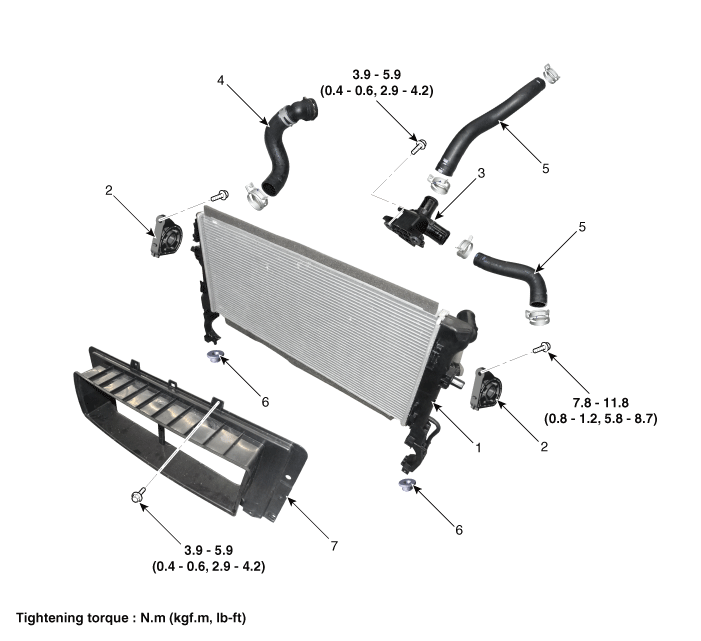
| 1. Radiator Assembly 2. Radiator upper mounting bracket 3. Filler neck assembly 4. Radiator lower hose |
5. Radiator upper hose 6. Radiator lower mounting insulator 7. Radiator air guard |
 Cooling Fan Repair procedures
Removal and Installation
Cooling Fan Assembly
1.
Disconnect the battery negative terminal from the battery.
2.
Remove the air duct and ...
 Radiator Repair procedures
Removal and Installation
1.
Loosen the drain plug, and drain the coolant and remove the radiator
cap to speed draning.
(Refer to Cooling System - "Coo ...
Other information:
Hyundai Kona (OS) 2018-2026 Owners Manual: Trip modes
To change the trip mode, press the TRIP button on the steering wheel.
Distance To Empty (1)
The distance to empty is the estimated distance the vehicle can be driven
with the remaining fuel.
If the estimated distance is below 1 km, the trip computer will display
"----" as distance to empty ...
Hyundai Kona (OS) 2018-2026 Service Manual: General information
General Troubleshooting
Information
Before Troubleshooting
1.
Check applicable fuses in the appropriate fuse/relay box.
2.
Check the battery for damage, state of charge, and clean and tight connections.
(Refer to Engine Ele ...
В© 2018-2026 www.hkona.com
