
Hyundai Kona: Ignition Switch Assembly / Repair procedures
Hyundai Kona (OS) 2018-2026 Service Manual / Body Electrical System / Ignition Switch Assembly / Repair procedures
| Replacement |
| 1. |
Disconnect the negative (-) battery terminal.
|
| 2. |
Remove the crash pad lower panel.
(Refer to Body - "Crash Pad")
|
| 3. |
Remove the steering column upper & Lower shroud.
|
| 4. |
Set the key to ACC.
|
| 5. |
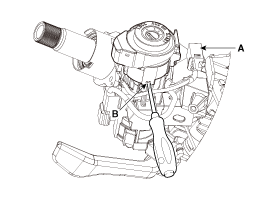
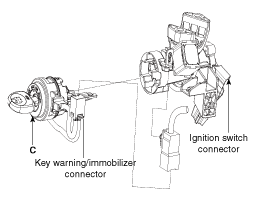
Disconnect the connector (A) and then remove the lock cylinder (C)
after pushing the lock pin (B).
|
| 6. |
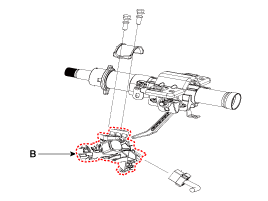
Loosen the mounting bolts and then remove the ignition switch (B).
|
| Inspection |
| 1. |
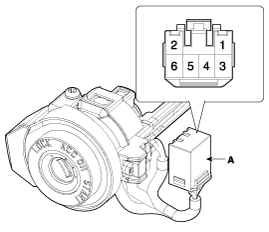
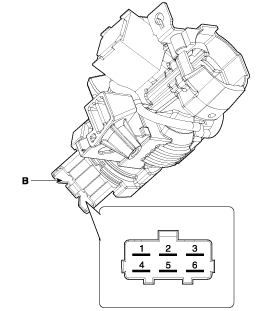
Disconnect the ignition switch connector (A) and key warning switch
connector (B) from under the steering column.
|
| 2. |
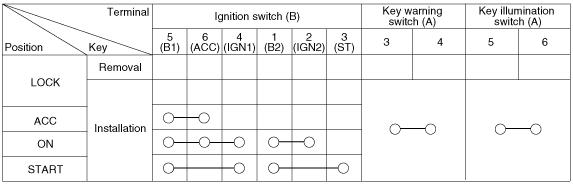
Check for continuity between the terminals.
|
| 3. |
If continuity is not specified, replace the switch.
|
| Installation |
| 1. |
Install the key lock cylinder.
|

| 2. |
Install the key warning and immobilizer connector.
|
| 3. |
Install the ignition switch.
|
| 4. |
Install the steering column shrouds and crash pad lower panel.
|
| 5. |
Connect the negative (-) battery terminal.
|

 Back View Camera System Components and components location
Component Location
1. Back view camera
2. AVN monitor
...
Other information:
Hyundai Kona (OS) 2018-2026 Service Manual: Fender Garnish Repair procedures
Replacement
•
Put on gloves to prevent hand injuries.
•
Wh ...
Hyundai Kona (OS) 2018-2026 Service Manual: Blower Motor Repair procedures
Inspection
1.
Connect the battery voltage and check the blower motor rotation.
2.
If the blower motor does not operate well, substitute with a known-good
blower motor and check for proper operation.
...
© 2018-2026 www.hkona.com
