
Hyundai Kona: Button Engine Start System / Start/Stop Button Repair procedures
Hyundai Kona (OS) 2018-2026 Service Manual / Body Electrical System / Button Engine Start System / Start/Stop Button Repair procedures
| Removal |
| 1. |
Disconnect the negative (-) battery terminal.
|
| 2. |
Remove the crash pad lower panel.
(Refer to Body - "Crash Pad Lower Panel" )
|
| 3. |
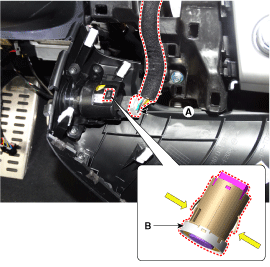
Remove the start/stop button (B) after disconnecting the start/stop
button connector (A).
|
| Installation |
| 1. |
Install the start / stop button.
|
| 2. |
Remove the crash pad side ganish (RH).
|
| 3. |
Connect the negative (-) battery terminal.
|
 Start/Stop Button Components and components location
Component
...

Other information:
Hyundai Kona (OS) 2018-2026 Service Manual: Cylinder Block Repair procedures
Disassembly
•
Use fender covers to avoid damaging painted surfaces.
•
To avoid damaging the cylinder head, wait until the engine coolan ...
Hyundai Kona (OS) 2018-2026 Owners Manual: Jack label
The actual Jack label in the vehicle may differ from the illustration. For more
detailed specifications, refer to the label attached to the jack.
1. Model Name 2. Maximum allowable load 3. When using the jack, set your
parking brake. 4. When using the jack, stop the engine. 5. Do not get under
a ...
© 2018-2026 www.hkona.com
