
Hyundai Kona: AVN System / AVN(Audio Video Navigation) head unit Components and components location
Hyundai Kona (OS) 2018-2026 Service Manual / Body Electrical System / AVN System / AVN(Audio Video Navigation) head unit Components and components location
| Components |
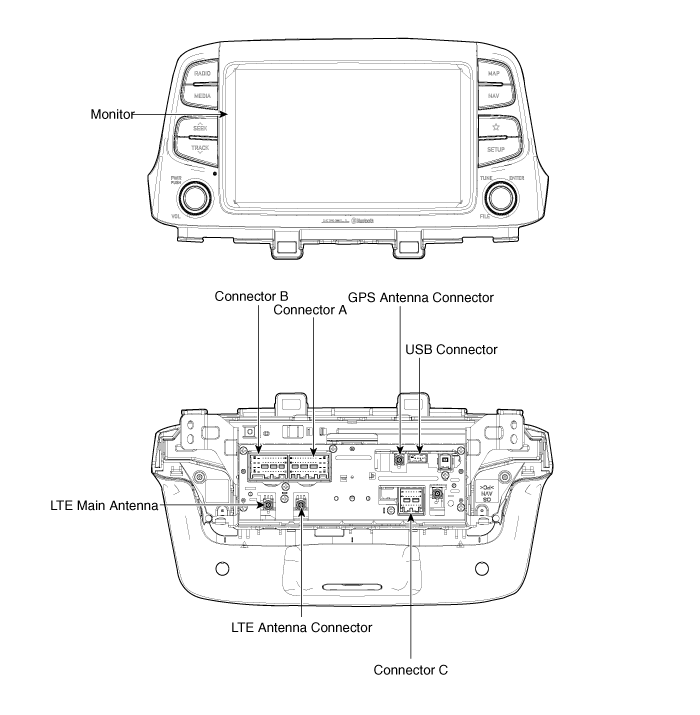
Connector Pin Information
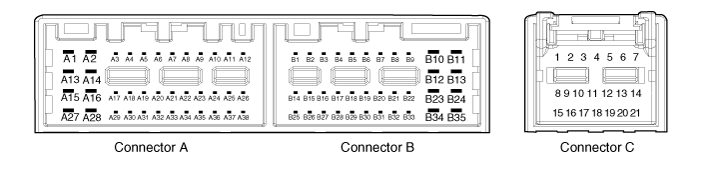
|
No |
Connector A |
Connector B |
Connector C |
|
1 |
- |
- |
- |
|
2 |
- |
MIC signal |
Chassis-CAN (High) |
|
3 |
Amp (+) |
- |
- |
|
4 |
Amp SPDIF (High) |
- |
- |
|
5 |
- |
Antenna power |
- |
|
6 |
Camera power |
Illumination (+) |
- |
|
7 |
Camera vedio input |
Multmedia-CAN (High) |
- |
|
8 |
- |
- |
- |
|
9 |
- |
- |
Chassis-CAN (Low) |
|
10 |
AUX audio(RH) |
Battery (+) |
- |
|
11 |
AUX detect |
Battery (+) |
- |
|
12 |
Whees switch |
GND |
- |
|
13 |
- |
GND |
- |
|
14 |
- |
MIC GND |
- |
|
15 |
- |
MIC (-) |
- |
|
16 |
- |
- |
MTS |
|
17 |
Amp (-) |
- |
- |
|
18 |
Amp SPDIF (Low) |
- |
- |
|
19 |
Amp SPDIF (GND) |
Illumination (-) |
- |
|
20 |
Camera power (GND) |
Multmedia-CAN (Low) |
- |
|
21 |
Camera vedio GND |
- |
- |
|
22 |
- |
ACC |
|
|
23 |
- |
GND |
|
|
24 |
AUX audio (LH) |
GND |
|
|
25 |
AUX audio GND |
- |
|
|
26 |
Steering wheel switch (GND) |
- |
|
|
27 |
- |
- |
|
|
28 |
- |
- |
|
|
29 |
- |
- |
|
|
30 |
- |
- |
|
|
31 |
- |
- |
|
|
32 |
- |
- |
|
|
33 |
Camera sheld GND |
IGN 1 |
|
|
34 |
- |
- |
|
|
35 |
- |
- |
|
|
36 |
- |
||
|
37 |
- |
||
|
38 |
Speed |
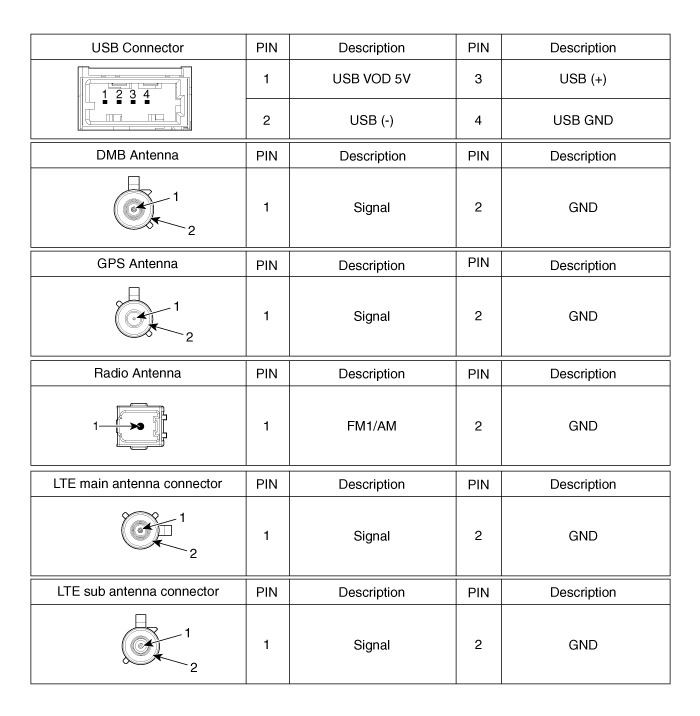
 Description and operation
Description
AVN System
The AVN system has improved information search and easiness of manipulation
for the driver by simplifying the system operation experience and unifying the ...
 AVN(Audio Video Navigation) head unit Repair procedures
Removal
•
Take care not to scratch the cluster fascia panel and related
parts. ...
Other information:
Hyundai Kona (OS) 2018-2026 Owners Manual: Transmission ranges
The indicator in the instrument cluster displays the shift lever position when
the ignition switch is in the ON position.
P (Park)
Always come to a complete stop before shifting into P (Park).
To shift from P (Park), you must depress firmly on the brake pedal and make sure
your foot is off the acc ...
Hyundai Kona (OS) 2018-2026 Service Manual: Injector Specifications
Specification
Item
Specification
Coil Resistance (Ω)
1.5 ± 0.075 [20°C (68°F)]
...
© 2018-2026 www.hkona.com
