
Hyundai Kona: Lighting System / Back-up Lamps Repair procedures
Hyundai Kona (OS) 2018-2026 Service Manual / Body Electrical System / Lighting System / Back-up Lamps Repair procedures
| Removal |
LHD
| 1. |
Disconnect the negative (-) battery terminal.
|
| 2. |
Remove the rear bubper.
(Refer to Body - "Rear Bumper")
|
| 3. |
Loosen the screw and then remove the back up lamp assembly. [Right
side only]
|
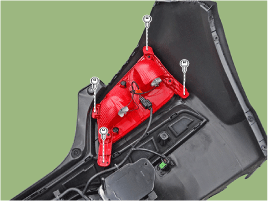
| 4. |
Remove the back up lamp bulb. [Right side only]
|
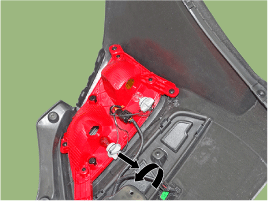
RHD
| 1. |
Disconnect the negative (-) battery terminal.
|
| 2. |
Remove the rear bubper.
(Refer to Body - "Rear Bumper")
|
| 3. |
Loosen the screw and then remove the back up lamp assembly. [Left
side only]
|
| 4. |
Remove the back up lamp bulb. [Left side only]
|
| Installation |
| 1. |
Install the back up lamp.
|
| 2. |
Install the rear bumper.
|
| 3. |
Connect the negative (-) battery terminal.
|
 Head Lamps Repair procedures
Head Lamp Aiming Instructions
[Mechanical Aiming]
The head lamps should be aimed with the proper beam-setting equipment, and
in accordance with the equipment manufactur ...
 Turn Signal Lamp Repair procedures
Removal
Front turn signal lamp
1.
Disconnect the negative (-) battery terminal.
2.
Remove the Daytime Running Ligh ...
Other information:
Hyundai Kona (OS) 2018-2026 Service Manual: Front Seat Belt Buckle Components and components location
Component Location
1. Front seat belt buckle
...
Hyundai Kona (OS) 2018-2026 Service Manual: Rear Door Outside Handle Repair procedures
Replacement
1.
Remove the plug hole.
2.
After loosening the mounting bolt, remove the rear door outside handle
cover (A).
Tightening torque :
7.8 - 10.8 N.m (0.8 - 1.1 kgf.m, 5.8 - 8.0 lb-ft)
...
В© 2018-2026 www.hkona.com
