
Hyundai Kona: Air Conditioning System / Cluster Ionizer Repair procedures
| Inspection |
| 1. |
Press the MODE switch more then 4 times within 2 seconds while pressing
the OFF switch.
* For diagnostic procedure, refer to DTC guide.
|
| Diagnosis With GDS |
| 1. |
The heating, ventilation and air conditioning can be quickly diagnosed
failed parts with vehicle diagnostic system (GDS).
※ The diagnostic system (GDS) provides the following information.
(1) Self diagnosis : Checking the failure code (DTC) and display.
(2) Current data : Checking the system input/output data state.
(3) Actuation test : Checking the system operation condition.
(4) Additional function : Other controlling such as he system option
and zero point adjustment.
|
| 2. |
Select the 'Car model' and the system to be checked in order to
check the vehicle with the tester.
|
| 3. |
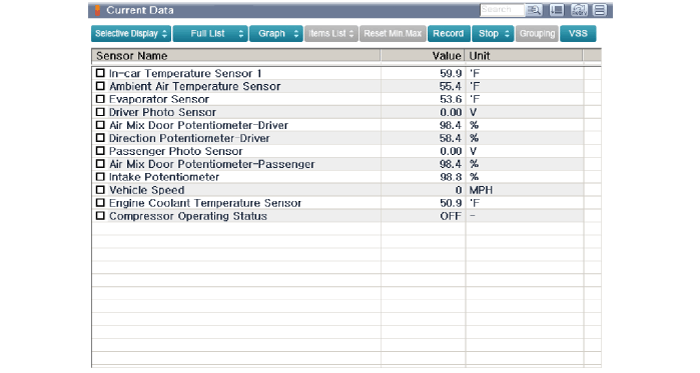
Select the 'Current data' menu to search the current state of the
input / output data.
The input / output data for the sensors corresponding to the Cluster
Ionizer can be checked.
|
| Replacement |
| 1. |
Disconnect the negative (-) battery terminal.
|
| 2. |
Remove the glove box housing cover.
(Refer to Body - "Glove Box Housing Cover")
|
| 3. |
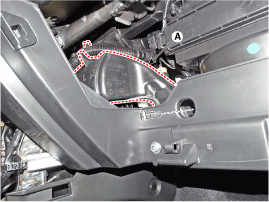
Remove the passenger's side shower duct (A).
|
| 4. |
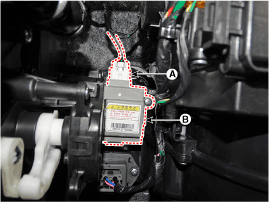
Disconnect the connector (A) and then remove the passenger's side
temperature control actuator (B) after loosening the mounting screws.
|
| 5. |
To install, reverse the removal procedure.
|
 Cluster Ionizer Description and operation
Description
The cluster ionizer makes disinfection and decomposition of bad smell from
the air-conditioner or inflow air. And it cleans the inside air of a vehicle.
Whe ...
 Heater
...
Other information:
Hyundai Kona (OS) 2018-2026 Owners Manual: Headlamp leveling device
Manual type
To adjust the headlamp beam level according to the number of the passengers and
loading weight in the luggage area, turn the beam leveling switch.
The higher the number on the switch position, the lower the headlamp beam level.
Always keep the headlight beam at the proper leveling pos ...
Hyundai Kona (OS) 2018-2026 Service Manual: BJ Boot Components and components location
Components (1)
[Gamma 1.6 T-GDI, Nu 2.0 MPI]
1. BJ assembly
2. BJ circlip
3. BJ boot band
4. BJ boot
5. Dynamic damper band
6. Dynamic damper
7. Shaft
8. TJ boot band
9. TJ boot
10. Spider assembly
11. Snap ring
12. TJ case
...
