
Hyundai Kona: Engine and Transaxle Assembly / Engine Mounting Repair procedures
| Removal and Installation |
| 1. |
Remove the engine room under cover.
(Refer to Engine and Transaxle Assembly - "Engine Room Under Cover")
|
| 2. |
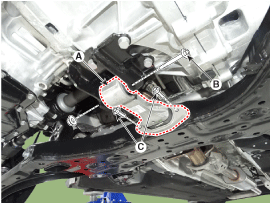
Remove the roll rod bracket (A).
|
| 3. |
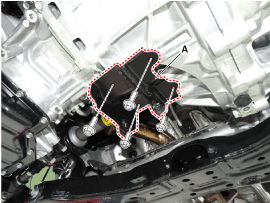
Remove the roll rod mounting support bracket (A).
|
| 4. |
Install in the reverse order of removal.
|
| 1. |
Remove the engine room under cover.
(Refer to Engine and Transaxle Assembly - "Engine room under cover")
|
| 2. |
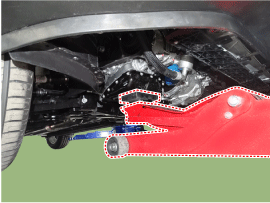
Install the jack to the edge of upper oil pan to support the engine.
|

| 3. |
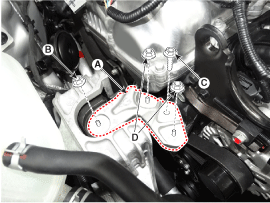
Remove the engine mounting support bracket (A).
|
| 4. |
Remove the reservoir tank.
(Refer to Cooling System - "Reservoir Tank")
|
| 5. |
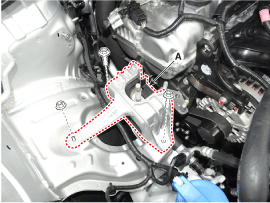
Remove the engine mounting bracket (A).
|
| 6. |
Install in the reverse order of removal.
|
| 1. |
Remove the air duct and air cleaner assembly.
(Refer to Intake and Exhaust System - "Air Cleaner")
|
| 2. |
Remove the battery.
(Refer to Engine Electrical System - "Battery")
|
| 3. |
Remove the ECM.
(Refer to Engine Control / Fuel System - "Engine Control Module (ECM)")
|
| 4. |
Remove the battery tray.
(Refer to Engine Electrical System - "Battery")
|
| 5. |
Remove the engine room under cover.
(Refer to Engine Room Under Cover - "Engine Room Under Cover")
|
| 6. |
Install the jack to the edge of transaxle.
|
| 7. |
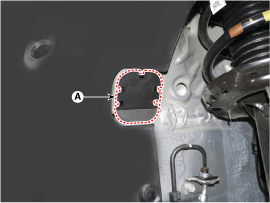
Remove the service cover (A).
|
| 8. |
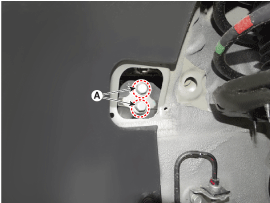
Remove the transaxle mounting bolts (A).
|
| 9. |
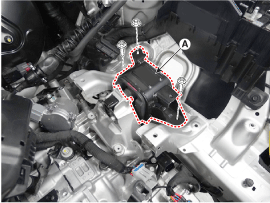
Remove the transaxle mounting bracket (A).
|
| 10. |
Install in the reverse order of removal.
|
 Engine Mounting Components and components location
Components
1. Transaxle mounting bracket
2. Roll rod bracket
3. Engine mounting bracket
4. Engine mounting support bracket
...
 Engine and Transaxle Assembly Repair procedures
Removal
•
Use fender covers to avoid damaging painted surfaces.
...
Other information:
Hyundai Kona (OS) 2018-2026 Service Manual: AGM Battery Description and operation
Description
[AGM Battery for ISG System]
AGM battery is used for especially heavy load on the vehicle network depending
on equipment and requirements. AGM stands for Absorbent Glass Material Battery;
that is absorbent glass fibre fleece. AGM batteries are fitted in models w ...
Hyundai Kona (OS) 2018-2026 Owners Manual: 4 Wheel Drive (4WD) LOCK Indicator Light
This indicator light illuminates:
Once you set the ignition switch or Engine Start/Stop Button to the ON
position. - It illuminates for approximately 3 seconds and then goes off.
When you select 4WD Lock mode by pressing the 4WD LOCK button. - The
4WD LOCK mode is to increase the drive power ...
