
Hyundai Kona: Indicators And Gauges / Instrument Cluster Description and operation
Hyundai Kona (OS) 2018-2026 Service Manual / Body Electrical System / Indicators And Gauges / Instrument Cluster Description and operation
| Description |
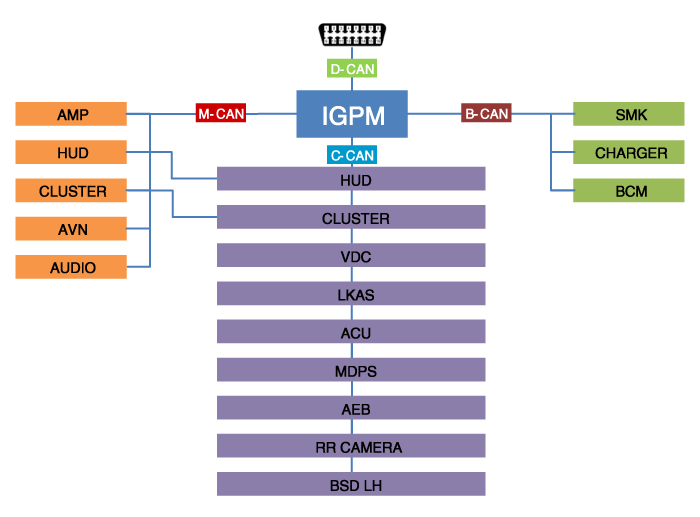
Communication Network Diagram
|
Abbreviation |
Expalnation |
|
ACU |
Airbag Control Unit |
|
AEB |
Autonomous Emergency Braking |
|
AMP |
Amplifier |
|
AVN |
Head Unit (Audio / AVN) |
|
B_CAN |
Body Controller Area Network |
|
BCM |
Body Control Module |
|
BCW |
Blind-Spot Collision Warning Indicator |
|
C_CAN |
Chassis Controller Area Network |
|
CLU |
Cluster Module |
|
CARMERA |
Rear View Carmera |
|
M_CAN |
Multi media Controller Area Network |
|
MDPS |
Motor Driven Power Steering |
|
P_CAN |
Powertrain Controller Area Network |
|
SJB |
Smart Junction Block |
|
SMK |
Smart Key Unit |
Cluster Variant Coding
As we have more options (ESC, MDPS, SCC, etc.) in the car, the dashboard
now have more information to display depending on the chosen options.
For this reason, we need to learn which options the current vehicle when
we replace the dashboard.
To address this issue, a course of learning based on the option required
for the vehicle when replacing the dashboard should be carried out.
This is called Variant Coding.
Function
| 1. |
High speed CAN communication (C-CAN)
|
| 2. |
Low speed CAN communication (MM-CAN)
|
| 3. |
Sound output
Instrument cluster and the external speakers connected to the output
of the various beeps and sound effects.
If External AMP is applied, the directional alarm is outputted through
the amp.
|
| 4. |
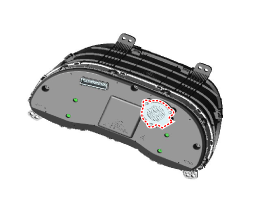
User Setting Mode (USM)
Setting can be changed by using switchs (Menu, UP, Down and OK button).
There are many items (for example, In/Out Seat Synchronization,
In/Out Steering Wheel Synchronization, Auto Door Lock, Auto Door
Lock Deactivate, Head Lamp Escort, Welcome Light, Welcome Sound,
One Touch Turn Signal, Average Fuel Consumption Auto Reset, Brightness,
and Content Setup) that can be set and customized. The signal flow
during setting is as follows.
|

 Instrument Cluster Schematic diagrams
Circuit Diagram
[Mono type (3.5")]
[Super vision type (4.2")]
[Super vision type (4.2")]
...
 Instrument Cluster Repair procedures
Removal
•
Put on gloves to protect your hands.
...
Other information:
Hyundai Kona (OS) 2018-2026 Service Manual: AUX jack Repair procedures
Removal
1.
Disconnect the battery (-) terminals.
2.
Remove the floor console assembly.
(Refer to Body - "Floor Console Assembly")
3.
Remove the multimedia jack (A) from the console under cover ...
Hyundai Kona (OS) 2018-2026 Owners Manual: Anti-lock Brake System (ABS)
An Anti-Lock Braking System (ABS) or an Electronic Stability Control (ESC)
system will not prevent accidents due to improper or dangerous driving maneuvers.
Even though vehicle control is improved during emergency braking, always maintain
a safe distance between you and objects ahead of you. Vehi ...
© 2018-2026 www.hkona.com
