
Hyundai Kona: Intake and Exhaust System / Intercooler Repair procedures
| Removal and Installation |
| 1. |
Disconnect the battery negative terminal.
|
| 2. |
Remove the engine cover.
(Refer to Engine and Transaxle Assembly - "Engine Cover")
|
| 3. |
Remove the engine room under cover.
(Refer to Engine And Transmission Assembly - "Engine Room Under Cover")
|
| 4. |
Remove the air duct and air cleaner assembly.
(Refer to Intake and Exhaust System - "Air Cleaner")
|
| 5. |
Remove the intercooler inlet hose and pipe.
|
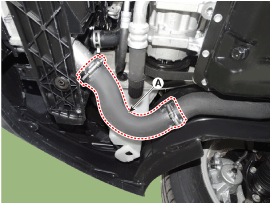

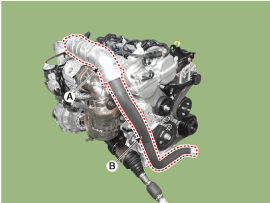
| 6. |
Remove the intercooler outlet hose and pipe.
|
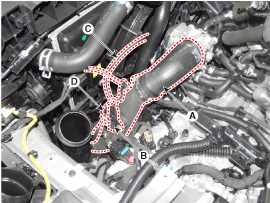
| 7. |
Remove the front bumper.
(Refer to Body (Interior and Exterior) - "Front Bumper")
|
| 8. |
Remove the inter cooler air guard (A).
|
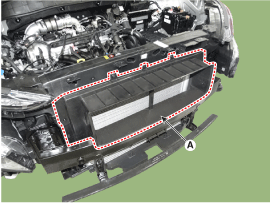
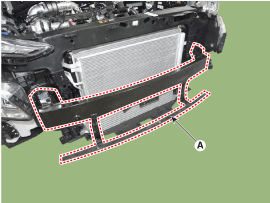
| 9. |
Remove the front bumper beam (A).
|
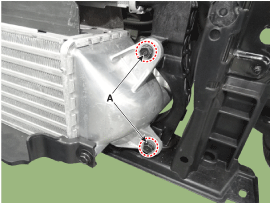
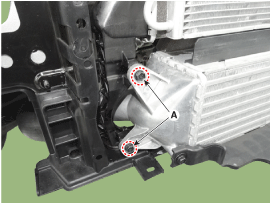
| 10. |
Remove the inter cooler mounting bolts (A).
[LH]
[RH]
|
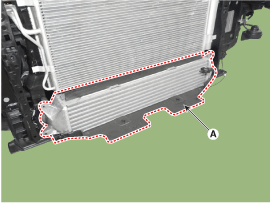
| 11. |
Remove the inter cooler assembly (A).
|
| 12. |
Install in the reverse order of removal.
|
 Intercooler Components and components location
Components
1. Intercooler
2. Intercooler air guard
3. Intercooler inlet hose
4. Intercooler inlet pipe
5. Intercooler outlet hose
6. Intercooler outlet ...
 Turbo Charger Components and components location
Components
1. Turbine
housing
2. Turbine inlet
3. Turbine outlet
4. Compressor housing
5. Compressor inlet
6. Compressor
outlet
7. Center hou ...
Other information:
Hyundai Kona (OS) 2018-2026 Owners Manual: Automatic heating and air conditioning
The Automatic Climate Control System is controlled by setting the desired temperature.
1. Press the AUTO button. (3)
The modes, fan speeds, air intake and air-conditioning will be controlled automatically
by the temperature setting you select.
2. Turn the temperature control knob (1) to the desired ...
Hyundai Kona (OS) 2018-2026 Service Manual: Description and operation
Description
It's a system that uses illumination sensor to automatically turn ON the
tail lamp and head lamp based on the change in surrounding environment's
illumination condition. It activates when the vehicle enters/exits tunnel,
or when the illumination ...
