
Hyundai Kona: Power Windows / Power Window Switch Repair procedures
Hyundai Kona (OS) 2018-2026 Service Manual / Body Electrical System / Power Windows / Power Window Switch Repair procedures
| Inspection |
[Driver Power Window Switch]
| 1. |
Disconnect the negative (-) battery terminal.
|
| 2. |
Remove the driver door trim.
(Refer to Body - "Front Door Trim")
|
| 3. |
Disconnect the power window switch (A) connector from the door trim.
|
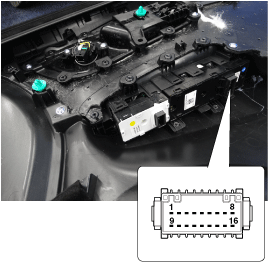
| 4. |
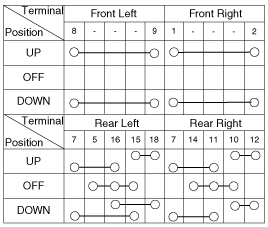
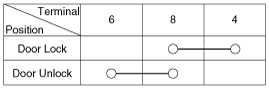
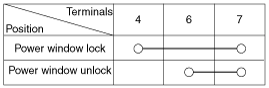
Check for continuity between the terminals in each switch position
as shown below.
[Power Window Switch Inspection]
[Power Door Lock Switch Inspection]
[Power Window Lock Switch Inspection]
|
[Assist Power Window Switch]
| 1. |
Disconnect the negative (-) battery terminal.
|
| 2. |
Remove the assist door trim.
(Refer to Body - "Front Door Trim")
|
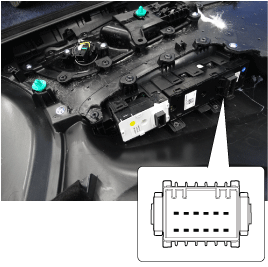
| 3. |
Disconnect the power mirror switch connector from the door trim.
|
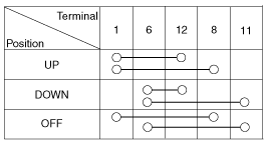
| 4. |
Check for continuity between the terminals in each switch position
as shown below.
|
Rear Power Window Switch
| 1. |
Disconnect the negative (-) battery terminal.
|
| 2. |
Remove the rear door trim.
(Refer to Body - "Rear Door Trim")
|
| 3. |
Disconnect the power mirror switch connector from the door trim.
|
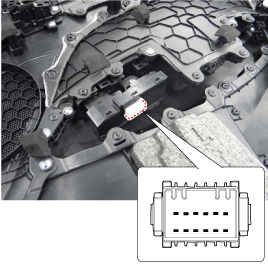
| 4. |
Check for continuity between the terminals in each switch position
as shown below.
[Rear Power Window Switch Inspection]
|
| Removal |
Driver / Assist Power Window Switch
| 1. |
Disconnect the negative (-) battery terminal.
|
| 2. |
Remove the front door trim.
(Refer to Body - "Front Door Trim")
|
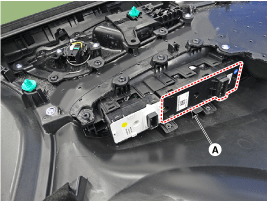
| 3. |
Remove the power window switch assembly (A).
|
Rear Power Window Switch
| 1. |
Disconnect the negative (-) battery terminal.
|
| 2. |
Remove the rear door trim.
(Refer to Body - "Rear Door Trim")
|
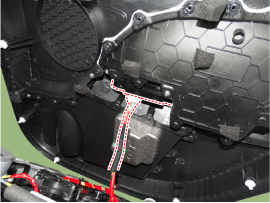
| 3. |
Discoonect the connector and then remove the power window switch
assembly.
|
| Installation |
Driver / Assist Power Window Switch
| 1. |
Install the power window switch assembly.
|
| 2. |
Install the front door trim after connect the connector.
|
Rear Power Window Switch
| 1. |
Install the power window switch assembly.
|
| 2. |
Install the rear power window switch.
|
 Power Window Switch Schematic diagrams
Circuit Diagram
Driver Power Window Switch
[Safety Power Window (Front)]
[Safety Power Window (Driver)]
[Auto Power Window]
Passenger Po ...

Other information:
Hyundai Kona (OS) 2018-2026 Owners Manual: Anti-lock Brake System (ABS)
An Anti-Lock Braking System (ABS) or an Electronic Stability Control (ESC)
system will not prevent accidents due to improper or dangerous driving maneuvers.
Even though vehicle control is improved during emergency braking, always maintain
a safe distance between you and objects ahead of you. Vehi ...
Hyundai Kona (OS) 2018-2026 Service Manual: Hood Latch Components and components location
Component Location
1. Hood latch assembly
...
В© 2018-2026 www.hkona.com
