
Hyundai Kona: Windshield Wiper/Washer / Windshield Wiper-Washer Switch Repair procedures
| Removal |
| 1. |
Disconnect the negative (-) battery terminal.
|
| 2. |
If it is necessary to remove multifunction switch assembly, remove
the steering wheel.
(Steering System - "Steering Wheel")
|
| 3. |
Remove the steering column upper shrouds.
(Refer to Body - "Steering Column Shroud Panel")
|
| 4. |
Remove the clock spring.
(Refer to Restraint - "Driver Airbag (DAB) Module and Clock Spring")
|
| 5. |
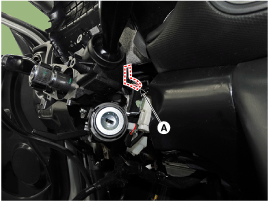
Disconnect the multifunction switch connector (A).
|
| 6. |
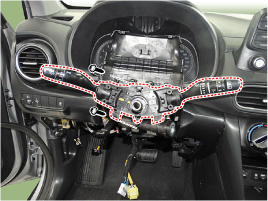
Loosen the screws (2EA) from the multifunction switch assembly.
|
| Installation |
| 1. |
Install the multifunction switch.
|
| 2. |
Install the clock spring and steering wheel.
|
| 3. |
Install the steering column upper and lower shrouds.
|
| 4. |
Install the steering wheel.
|
| Inspection (with GDS) |
| 1. |
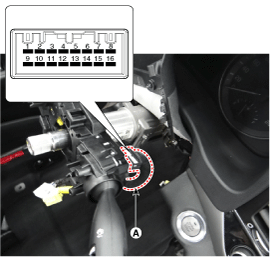
When each switch is pressed, check the electricity flow between
multi-function switch connector and grounding, and if the electricity
does not match the specification, replace the switch.
|
| 2. |
The body electrocal system can be quickly diagnosed failed parts
with vehicle diagnostic system (GDS).
The diagnostic system (GDS) provides the following information.
|
| 3. |
Select the "Car Model" and the system to be checked in order to
check the vehicle with the tester.
|
| 4. |
Select the "Body Control Module (BCM)" to check the Body Control
Module (BCM).
|
| 5. |
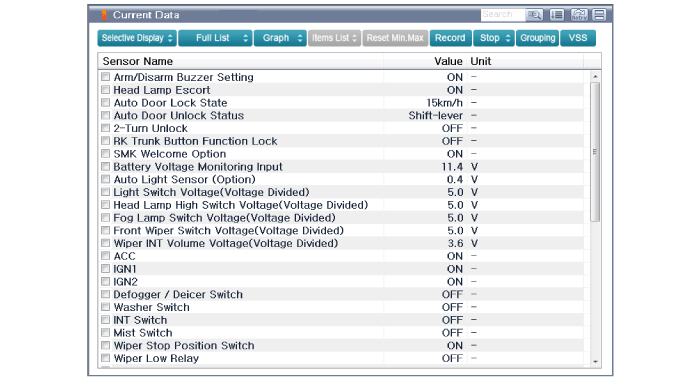
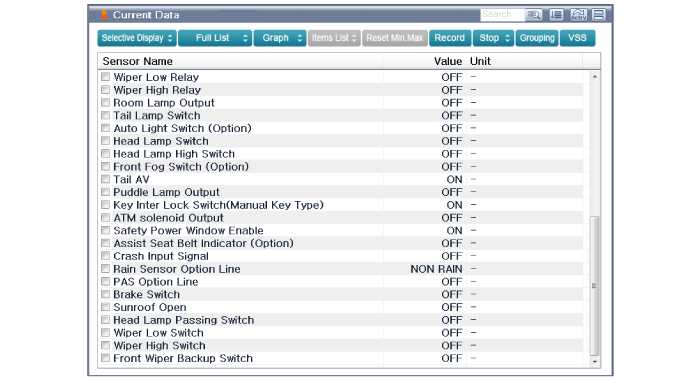
Select the "Current Data" menu to search the current state of the
input/output data.
The input/output data for the sensors corresponding to the Body
Control Module (BCM) can be checked.
|
 Components and components location
Component Location
1. Windshield wiper arm &
blade
2. Wiper & washer switch
3. Windshield washer hose & nozzle
4. Washer motor & ...
 Front Wiper Motor Components and components location
Component Location
1. Cap
2. Nut
3. Wiper arm & blade
4. Cowl top cover
5. Bolt
6. Wiper motor & linkage assembly
7. Wiper ...
Other information:
Hyundai Kona (OS) 2018-2026 Service Manual: General safety information and caution
Precautions
General Precautions
Please read the following precautions carefully before performing the airbag
system service.
Observe the instructions described in this manual, or the airbags could accidentally
deploy and cause damage or injuries.
•
...
Hyundai Kona (OS) 2018-2026 Service Manual: Components and components location
Components Location
1. PCV Valve
2. Canister
3. Purge Control Solenoid Valve (PCSV)
4. Fuel Tank Air Filter
5. Fuel Level Sensor (FLS)
6. Catalytic Converter (WCC)
7. Gasoline Particulate Filter (GPF)
1. PCV Valve
...
