
Hyundai Kona: Intake and Exhaust System / Air Cleaner Repair procedures
Hyundai Kona (OS) 2018-2026 Service Manual / Engine Mechanical System / Intake and Exhaust System / Air Cleaner Repair procedures
| Removal and Installation |
Air Cleaner Assembly
| 1. |
Disconnect the battery negative terminal.
|
| 2. |
Remove the engine cover.
(Refer to Engine and Transmission Assembly - "Engine Cover")
|
| 3. |
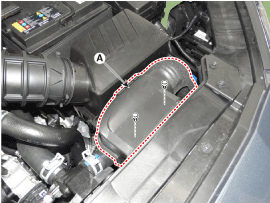
Remove the air duct (A).
|
| 4. |
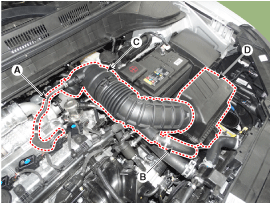
Remove the air cleaner assembly.
|
| 5. |
Install in the reverse order of removal.
|
Air Cleaner Element
| 1. |
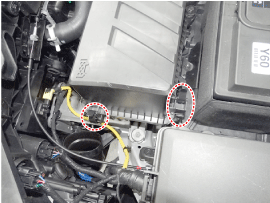
Open the air cleaner cover (A) by unhooking the clamps.
|
| 2. |
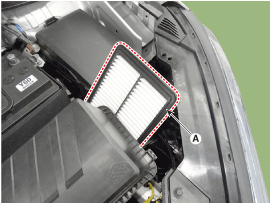
Replace the air cleaner element (A) with a new one.
|

| 3. |
Close the air cleaner cover by hooking the clamps.
|
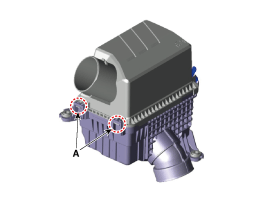
 Air Cleaner Components and components location
Components
1. Air cleaner body
2. Air cleaner element
3. Air cleaner upper cover
4. Air duct
5. Air intake hose
6. Breather hose
7. Resonator
...
 Intake Manifold Components and components location
Components
1. Intake manifold assembly
2. Intake manifold gasket
3. Electronic throttle body gasket
4. Electronic throttle body
5. Purge control ...
Other information:
Hyundai Kona (OS) 2018-2026 Service Manual: Rear Wheel Speed Sensor Components and components location
Components
[Tortion beam axle type]
1. Front wheel speed sensor
2. Rear wheel speed sensor cable
[Multi link type]
1. Front wheel speed sensor
2. Rear wheel speed sensor cable
...
Hyundai Kona (OS) 2018-2026 Service Manual: Repair procedures
Inspection
•
Wrap the protective tape on the tool to disassemble with
the screwdriver or remover.
•
...
© 2018-2026 www.hkona.com
