
Hyundai Kona: Charging System / Alternator Repair procedures
| Removal |
| 1. |
Turn ignition switch OFF and disconnect the battery negative (-) terminal.
|
| 2. |
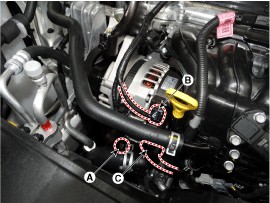
Disconnect the air compressor connector (A) and the alternator connector
(B), and remove the cable (C) from alternator "B" terminal.
|
| 3. |
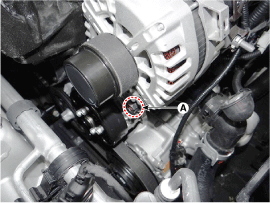
Loose the alternator by loosening the mounting lower bolt (A) lightly,
not completely, to remove the drive belt.
|
| 4. |
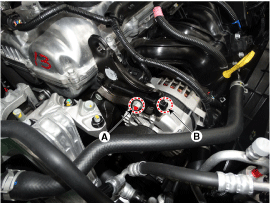
Loosen the mounting bolts (A) and then, turn the adjusting bolt (B)
clockwise to loosen tension.
|
| 5. |
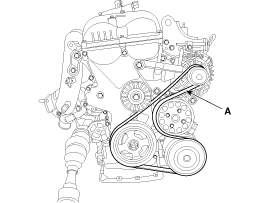
Remove the drive belt (A).
|
| 6. |
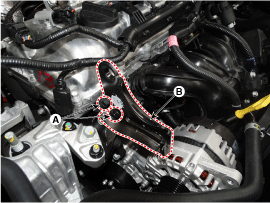
Remove the alternator brace bracket assembly (B) after loosening the
mounting bolt (A).
|
| 7. |
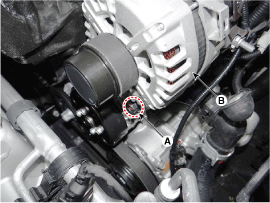
Remove the alternator mounting low bolt (A), and then remove the alternator
(B).
|
| Installation |
| 1. |
Install in the reverse order of removal.
|
| 2. |
Adjust the alternator belt tension after installation.
(Refer to Engine Mechanical System - "Drive Belt")
|
| Disassembly |
| 1. |
Remove the alternator.
(Refer to Charging System - "Alternator")
|
| 2. |
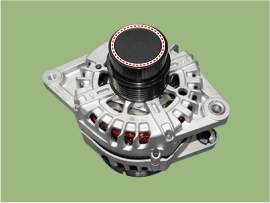
Remove the OAD (Overrunning Alternator Decoupler) cap (A).
|

| 3. |
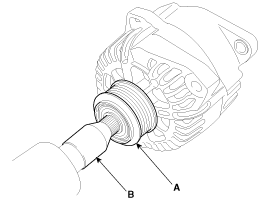
Remove the OAD(Overrunning Alternator Decoupler) pulley (A) using the
special tool.
|
| 4. |
Remove the rear cover (A) after removing nuts.
|
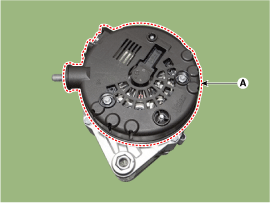
| 5. |
Remove the mounting bolts (A) and the regulator assembly (B).
|
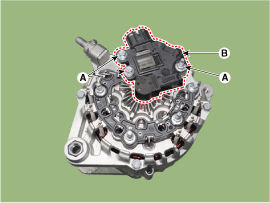
| 6. |
Remove the slip ring guide (A) after pulling it.
|
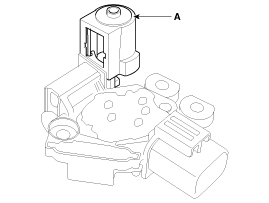
| 7. |
Unsolder the 3 stator leads (A).
|
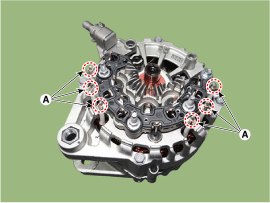
| 8. |
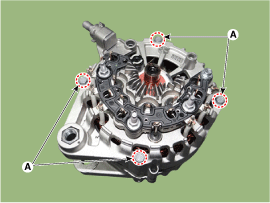
Remove the 4 through bolts (A).
|
| 9. |
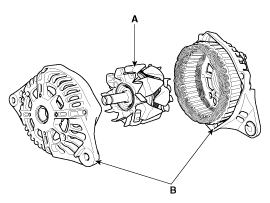
Disconnect the rotor (A) and bracket (B).
|
| Reassembly |
| 1. |
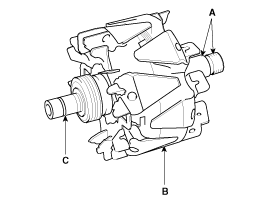
Check that there is continuity between the slip rings (C).
|
| 2. |
Check that there is no continuity between the slip rings and the rotor
(B) or rotor shaft (A).
|
| 3. |
If the rotor fails either continuity check, replace the alternator.
|
| 1. |
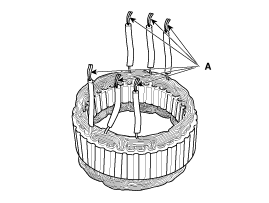
Check that there is continuity between each pair of leads (A).
|
| 2. |
Check that there is no continuity between each lead and the coil core.
|
| 3. |
If the coil fails either continuity check, replace the alternator.
|
 Alternator Components and components location
Components
1. OAP (Overrunning Alternator
Pulley)
2. Front bracket
3. Front bearing
4. Stator
5. Rotor
6. Rear Bearing
7. Rear Bracket
8. Bru ...
 DC/DC Converter Description and operation
Description
Due to the considerably more frequent occurrence of starting operations, the
electrical load that occurs often leads to voltage dips in the vehicle network.
In order ...
Other information:
Hyundai Kona (OS) 2018-2026 Owners Manual: Electric Chromic Mirror (ECM)
The electric rearview mirror automatically controls the glare from the headlamp
of the vehicle behind you in nighttime or low light driving conditions.
When the engine is running, the glare is automatically controlled by the sensor
mounted in the rearview mirror. The sensor detects the light level ...
Hyundai Kona (OS) 2018-2026 Service Manual: Repair procedures
Removal
1.
Disconnect the negative (-) battery terminal.
2.
Remove the glove box.
(Refer to Body - "Glove Box Upper Cover Assembly")
3.
Remove the smart key unit. ...
