
Hyundai Kona: Heater / Auto Defoging Actuator Repair procedures
| Inspection |
| 1. |
Turn the ignition switch OFF.
|
| 2. |
Disconnect the auto defogging connector.
|
| 3. |
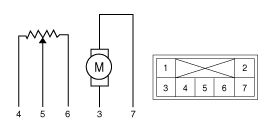
Verify that the auto defogging actuator operates to the open position
when connecting 12V to terminal 3 and grounding terminal 4.
Verify that the auto defogging actuator operates to the close position
when connected in reverse.
|
| 4. |
Connect the auto defogging actuator connector.
|
| 5. |
Turn the ignition switch ON.
|
| 6. |
Check the voltage between terminals 6 and 5.
Specification
|

| 7. |
If the measured voltage is not within specification, check the operation
by replacing the existing auto defogging actuator with a new genuine
part. After that, determine whether replacement of the auto defogging
actuator is required or not.
|
| Diagnosis With GDS |
| 1. |
The heating, ventilation and air conditioning can be quickly diagnosed
failed parts with vehicle diagnostic system (GDS).
※ The diagnostic system (GDS) provides the following information.
(1) Self diagnosis : Checking the failure code (DTC) and display.
(2) Current data : Checking the system input/output data state.
(3) Actuation test : Checking the system operation condition.
(4) Additional function : Other controlling such as he system option
and zero point adjustment.
|
| 2. |
Select the 'Car model' and the system to be checked in order to
check the vehicle with the tester.
|
| 3. |
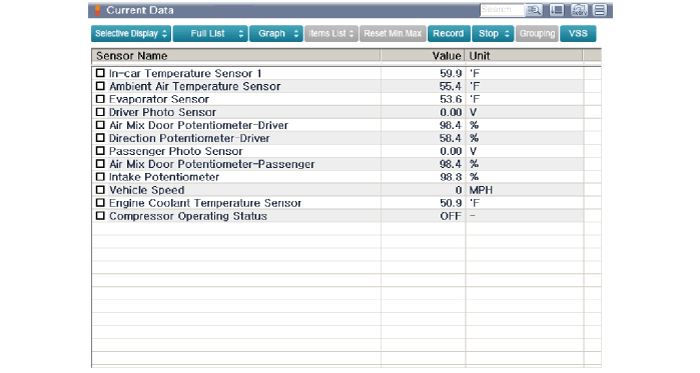
Select the 'Current data' menu to search the current state of the
input / output data.
The input / output data for the sensors corresponding to the Auto
Defogging Actuator can be checked.
|
| 4. |
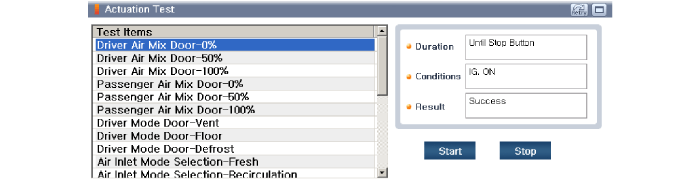
To perform compulsory operation on Auto Defogging Actuator input
factors, select "ACTUATION TEST".
|
| Replacement |
| 1. |
Disconnect the negative (-) battery terminal.
|
| 2. |
Remove the main crash pad assembly.
(Refer to Body - "Main Crash Pad Assembly")
|
| 3. |
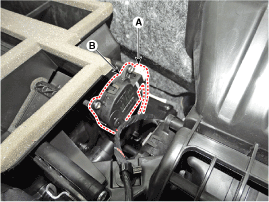
Disconnect the connector (A) and then remove the auto defogging
actuator (B) after loosening the mounting screws.
|
| 4. |
To install, reverse the removal procedure.
|
 Auto Defoging Actuator Description and operation
Description
The auto defogging sensor is installed on front window glass. The sensor
judges and sends signal if moisture occurs to blow out wind for defogging.
The air co ...
 Blower
...
Other information:
Hyundai Kona (OS) 2018-2026 Owners Manual: User settings mode
In this mode, you can change the settings of the instrument cluster, doors, lamps,
etc.
1. Head-up display (if equipped) 2. Driver Assistance 3. Door 4. Lights
5. Sound 6. Convenience 7. Service interval 8. Other Features 9. Languages
10. Reset
1. Head Up display (if equipped)
• Display Height
...
Hyundai Kona (OS) 2018-2026 Owners Manual: Engine compartment
â– Gasoline Engine (Kappa 1.0 T-GDI)
â– Gasoline Engine (Gamma 1.6 T-GDI)
1. Engine coolant reservoir/ Engine coolant cap 2. Fuse box 3. Battery
4. Brake/clutch fluid reservoir 5. Air cleaner 6. Engine oil dipstick 7. Engine
oil filler cap 8. Windshield washer fluid reservoir
The actual engine ...
