
Hyundai Kona: Brake System / Brake Pedal Repair procedures
Hyundai Kona (OS) 2018-2026 Service Manual / Brake System / Brake System / Brake Pedal Repair procedures
| Removal |
| 1. |
Turn ignition switch OFF and disconnect the negative (-) battery cable.
|
| 2. |
Remove the crash pad lower panel.
(Refer to Body - "Crash Pad")
|
| 3. |
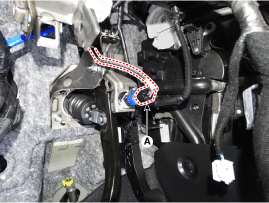
Disconnect the stop lamp switch connector (A).
|
| 4. |
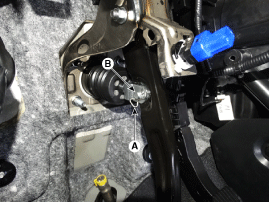
Separate the snap pin (A) and clevis pin (B).
|
| 5. |
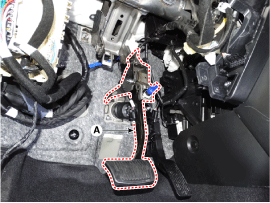
Remove the brake pedal assembly (A) after loosening the mounting bolts
and nuts.
|
| Inspection |
| 1. |
Check the brake pedal for bending or twisting.
|
| 2. |
Check the brake pedal return spring for damage.
|
| 3. |
Check the stop lamp switch.
(Refer to Brake System - "Stop Lamp Switch")
|
| Installation |
| 1. |
To install, reverse the removal procedure.
|
| Installation |
| 1. |
To install, reverse removal procedure.
|
 Brake Pedal Components and components location
Components
1. Stop lamp switch
2. Brake pedal arm assembly
3. Brake member assembly
4. Return spring
...
 Front Disc Brake Components and components location
Components
1. Caliper body
2. Guide rod pin
3. Guide rod pin boot
4. Caliper carrier
5. Pad inner shim
6. Pad retainer
7. Brake pad
8. Pad return ...
Other information:
Hyundai Kona (OS) 2018-2026 Service Manual: Rear Seat Assembly Components and components location
Component Location
1. Rear seat cushion assembly
2. Rear seat back assembly
...
Hyundai Kona (OS) 2018-2026 Service Manual: Piston and Connecting Rod Components and components location
Components
1. Piston ring
2. Piston
3. Connecting rod
4. Connecting rod upper bearing
5. Connecting rod lower bearing
6. Connecting rod bearing cap
7. Piston pin
8. Snap ring
...
В© 2018-2026 www.hkona.com
