
Hyundai Kona: Driveshaft Assembly / TJ Joint Repair procedures
| Disassembly |
|

| 1. |
Remove the front driveshaft.
(Refer to Driveshaft Assembly - “Front Driveshaft�)
|
| 2. |
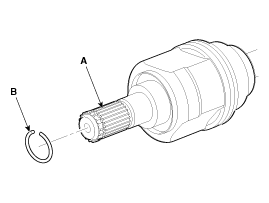
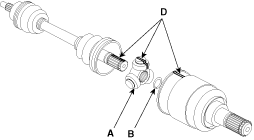
Remove the housing circlip (B) from the driveshaft spline (A).
|
| 3. |
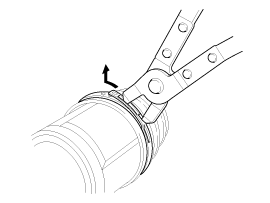
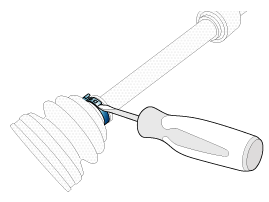
Remove both boot bands from the TJ housing.
|
| 4. |
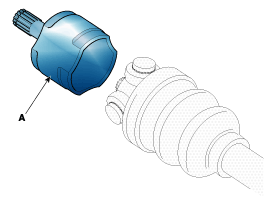
Remove the TJ housing (A).
|
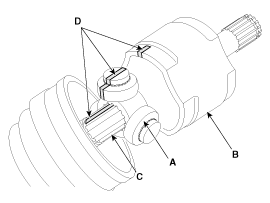
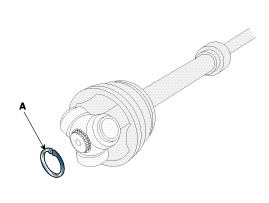
| 5. |
Remove the retainer ring (A) from the shaft.
|
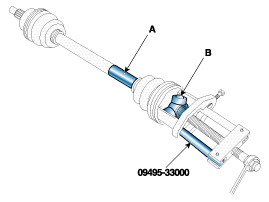
| 6. |
Remove the spider assembly (B) from the driveshaft (A) using the special
tool (09495-33000).
|
| 7. |
Clean the spider assembly.
|
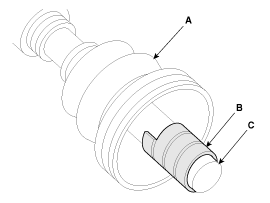
| 8. |
Remove the TJ boot (A).
|
| Inspection |
| 1. |
Check the spider assembly for roller rotation, wear or corrosion.
|
| 2. |
Check the groove inside the joint case for wear or corrosion
|
| 3. |
Check the TJ boots for damage and deterioration.
|
| Reassembly |
| 1. |
Wrap tape around the driveshaft spline(TJ) to prevent damage to the
boot.
|
| 2. |
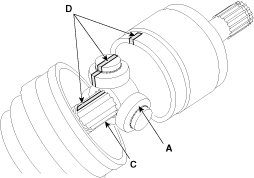
Using the alignment marks (D) made during disassembly as a guide, install
the spider assembly (A) and retainer ring (B) on the driveshaft splines
(C).
|
| 3. |
Add specified grease to the joint boot as much as it was wiped away
at inspection.
|
| 4. |
Install the both boot band.
|
| 5. |
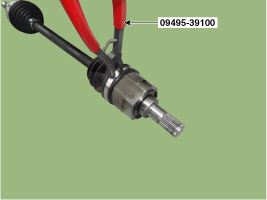
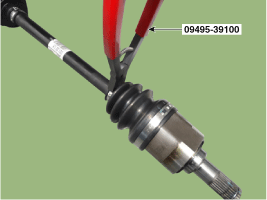
Using the SST (09495-39100) and long nose pliers , secure the TJ boot
bands.
|
| 6. |
Install the front driveshaft.
(Refer to Driveshaft Assembly - "Front Driveshaft")
|
| 7. |
Check the front alignment.
(Refer to Suspension System - "Front Alignment")
|
 TJ Joint Components and components location
Components (1)
[Gamma 1.6 T-GDI, Nu 2.0 MPI]
1. BJ assembly
2. BJ circlip
3. BJ boot band
4. BJ boot
5. Dynamic damper band
6. Dynamic damper
7. ...
 Dynamic Damper Components and components location
Components
1. BJ
assembly
2. BJ circlip
3. BJ boot band
4. BJ boot
5. Dynamic
damper band
6. Dynamic damper
7. Shaft
8. TJ boot band
...
Other information:
Hyundai Kona (OS) 2018-2026 Service Manual: Liftgate Weatherstrip Repair procedures
Replacement
1.
Remove the liftgate weatherstrip (A).
•
Do not apply sealant to the body.
...
Hyundai Kona (OS) 2018-2026 Owners Manual: Operation of the Parking Distance Warning (Reverse) system
Operating condition
This system will activate when backing up with the ignition switch in
the ON position. However, if vehicle speed exceeds 5 km/h (3 mph), the system
may not detect objects.
If vehicle speed exceeds 10 km/h (6 mph), the system will not warn you
even though objects are dete ...
